





Leadfeeder 2023 Costs, Specifications, Evaluations, And Alternatives

Leadfeeder is a software platform where you can generate leads and essential reports and analyze marketing trends. Once you do a Leadfeeder Login, you will find various tools that will help you to increase your business’ productivity and sales. It uses a network domain from Google Analytics, with the help of which you can get access to quality leads for your business.
In this article, you will get a review of Leadfeeder B2B. The first part comprises a general overview of the software platform. Then, we will explain the pricing of the app as well. Next up, we will share with you the major features of Leadfeeder, in addition to a comparison with another platform called Leadforensics.
Furthermore, you shall learn the pros and cons of Leadfeeder. Finally, we will share the biggest alternatives you will find in regard to the software. Hence, to learn more about this software, read on through to the end of the article.
Leadfeeder – A General Overview
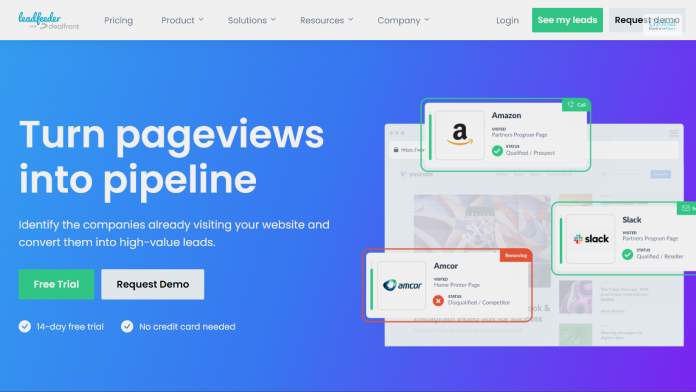
According to the official website of the platform,
“Leadfeeder is a website tracking script that combines data from your website and Google Analytics to tell you not just who visited your website but where they work, how long they stayed on your site, what pages they visited, and whether or not their company matches your ideal customer profile.”
The website helps you to find out the leads that can help your business to grow. The website platform comes with software tools that you can use to filter your leads for your business. Hence, you shall be able to locate the best options for your business, the ones that are of the best quality.
The automation features also help you to set alerts and come with various reporting features, which help you to identify those users that visited your site. You can then find out what are the candidates that are potential for sales.
Leadfeeder Pricing
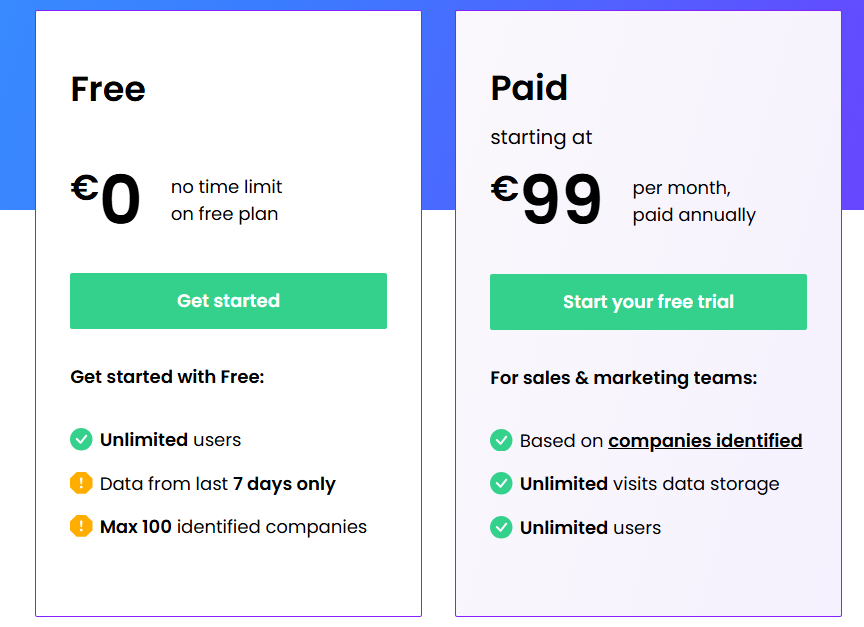
According to Leadfeeder’s official website,
“Powerful data is great — but if that data stays siloed in a tool you never remember to check, then it won’t do you much good. Leadfeeder uses integrations to put the data we gather to where ever you need it most — whether that’s in your CRM, email platform, or even Slack.”
Once you try to purchase the services of the platform, you will get a free trial for 14 days. However, when it comes to pricing, there are two options – A free one and a paid one.
| Plan | Price |
|---|---|
| Free | €0 |
| Paid | Starting at:€199 per month (annual billing) |
Leadfeeder – What Are Its Major Features?

Many people try to compare Leadfeeder and Lead Forensics. However, in most cases, leadfeeder comes to the top. The following are some of the major features of Leadfeeder that you must know:
- The website platform offers you transparent payment terms, which is not available with many other alternatives. You will only pay for the leads that Leadfeeder identifies for you.
- There is an all-time free plan that this platform offers you. Furthermore, in the first seven days, you can avail yourself of the best features as well.
- The automated features offer you notify you about your leads and opportunities. You can set up notifications as per your needs.
Apart from these features, Leadfeeder also offers you customer support as well. According to the official website,
“We offer live support via chat and email from support hours are 10:00 AM – 11:59 PM EET (3 AM – 5 PM EST), Monday to Friday, excluding holidays or special events.”
Leadfeeder Vs Lead Forensics – Major Features
Most of the basic features are similar between Leadfeeder and Lead Forensics. However, there are some major differences that need to be highlighted:
- Leadfeeder offers you data about lead scoring, while Lead Forensics does not.
- Although Lead Forensics offers you Slack integration, it provides you with a third-party platform.
- The Google Analytics Integration of Lead Forensics also comes with a third-party source.
- Lead Forensics offers you less number of CRM integrations as compared to Leadfeeder.
- The cost of Lead Forensics is almost four times as high as compared to Leadfeeder.
Hence, you can see from here that Leadfeeder is the clear leader when it comes to the features offered in one platform. Furthermore, on various review platforms, we have seen that Leadfeeder is the sure winner.
Major Pros And Cons Of Leadfeeder

According to Compare Wise,
“(Leadfeeder) is a great way to stay ahead of the competition by becoming aware of the various companies and their needs. You’ll have access to each potential client’s information for the contact, which gives your business an opportunity ahead of others.”
Here are the major pros and cons of Leadfeeder that you must know of:
Pros Of Leadfeeder
The following are the major pros of Leadfeeder that will benefit your business a lot:
- There is a free option available but with limited features. However, if you are a solopreneur or a freelancer, this option is great for you.
- With high-grade analytic tools, you will get a better potential to increase your sales.
- Leadfeeder helps you to organize your sales funnel better.
- You will have the option to get real-time insights and valuable data.
Cons Of Leadfeeder
The following are some of the cons of Leadfeeder that you must be aware of:
- The premium option available is a bit high. However, it comes with enough features for a business to get amazing insights.
- Not beginner-friendly. You will need to strategize beforehand if you want to make the most out of Leadfeeder.
Leadfeeder Competitors
The following are the major competitor alternatives of Leadfeeder that you must know of:
- Affinity
- Intercom
- Leadpages
- Kajabi
- Pipedrive
- Lusha
- LeadIQ
- Salesforce Marketing Cloud Account Engagement
- Hunter
- Lead Forensics
Summing Up
Hope this article was helpful for you in getting a better idea of Leadfeeder as a software platform for better lead generation. If you want affordable software to get high-quality data and analytics related to your leads on your website, this one is the best platform for you. Share your own reviews regarding the platform in the comments section below.
Tags:

Recent
Memory Chips Are Becoming More Important in the AI Era
Aug 06, 2026

Why Enterprise Web Applications Still Choose Angular for Long-Term Growth
Aug 04, 2026

Due Diligence Decoded: Why Careful Evaluation Still Wins in Business
Jul 11, 2026

How Hydraulic System Design Impacts Equipment Performance
Jul 01, 2026

Related Articles

Best Practices For Mobile Data Collection: Tips And Tricks
In today's digital age, data collection has become critical for businesses, organizations, and even individuals. Data is collected to make informed decisions, track progress, and measure success. One of the most efficient ways of collecting data is through mobile devices such as smartphones and tablets. Mobile data collection allows you to gather information in real-time, even in remote locations. However, collecting data on mobile devices can be tricky, and if not done correctly, it can lead to inaccurate results. This blog will explore some of the best practices for digital data collection and provide tips and tricks on how to get the most out of your data. Plan Your Data Collection Process The first step in digital data collection is to plan your data collection process. Before you start collecting data, you should have a clear idea of what data you want to collect, why you want to collect it, and how you plan to use it. You should also identify the data collection tools you will use and the people who will collect the data. Planning your data collection process will help you avoid collecting irrelevant or unnecessary data, which can lead to inaccurate results. Choose the Right Data Collection Tools Many data collection tools are available for mobile devices. The most popular tools include mobile forms, surveys, and questionnaires. When choosing a data collection tool, you should consider factors such as the type of data you want to collect, the data's complexity, and the tool's user-friendliness. You should also ensure your chosen tool is compatible with your mobile device. Ensure Data Security Data security is critical when collecting data on mobile devices. You should ensure that the data you collect is secure and protected from unauthorized access. To ensure data security, you should use encryption to protect the data in transit and at rest. You should also ensure that the mobile devices used for data collection are secure and have updated antivirus software. Test Your Data Collection Process Before rolling out your data collection process, you should test it to ensure it works as expected. Testing your data collection process will help you identify any bugs or issues that may affect the accuracy of your results. You should also test your data collection process with a small sample of respondents before rolling it out to a larger audience. Provide Clear Instructions When collecting data on mobile devices, it is essential to provide clear instructions to the respondents. The instructions should be simple and easy to follow and clearly explain what the respondents are expected to do. Giving clear instructions will help ensure that the data you collect is accurate and reliable. Train Your Data Collectors If you plan to use people to collect data on your behalf, you should ensure that they are trained on how to use the data collection tools and the data collection process. The training should cover topics such as how to approach respondents, ask questions, and record data accurately. Training your data collectors will help ensure your data is accurate and reliable. Monitor Your Data Collection Process Monitoring your data collection process is essential to collect accurate and reliable data. You should monitor your data collection process regularly to identify any issues that may affect the accuracy of your results. You should also track the progress of your data collection process to ensure you collect the data you need within the allocated time frame. In conclusion, mobile data collection is efficient, but it requires proper planning, preparation, and execution to achieve accurate and reliable results. By following the best practices outlined above, you can ensure that your data collection process runs smoothly and produces the data you need to make informed decisions. Read Also: How To Improve Energy Efficiency In Your Data Centre Money Tap Loan App: Information, Eligibility Criteria, Interest Rates, Review & More Virtual Data Rooms: What They Are And Their Critical Importance For Businesses
Mar 27, 2023

What Is Infusionsoft By Keap? – Let’s Discuss The Best Features, Alternatives, And More
Infusionsoft CRM is a customer relationship management software. It is now known as Keap. The software system is best suited for small business owners and startups. It is not an advanced CRM and hence is for someone that is new to the category. The software platform allows you to combine sales and marketing automation processes, which can be quite useful for new eCommerce businesses. The first part of this article consists of a general review of Keap, and secondly, we will show you the plans and pricing of the software platform. Next up, we will look at the major features of Keap, and you will understand whether Keap is a good all-in-one solution for your business or not. Finally, we will discuss the major pros and cons of Keap, followed by some Keap (Infusionsoft) alternatives. Keap (Infusionsoft) - A General Overview Once you do an Infusionsoft Login (or Keap Login), you will come across a lot of features, and you will find amazing customization options. This shall help you personalize the software as per the needs of your business. It can streamline your lead management and sales processes really well. According to Business News Daily, “The platform’s easy automations save customers a reported 10 hours per week by eliminating manual tasks such as sending texts and email follow-ups and recording new leads immediately after they complete a form on your landing page or social media account.” Another useful thing about Keap is that setting up this CRM is easy and fast. Furthermore, there are drag-and-drop sales pipeline builders. which makes things easy for you. Thereby, you have a better chance of getting organized, and you shall have a clear picture of the best business opportunities near you. Infusionsoft Pricing - Major Subscription Plans In Keap One of the best things that we have seen about Keap is that it has contact-based pricing. There are three different pricing levels of Keap. These are explained below: PlansPricingPro$159 per month (annual billing) for 1500 contactsMax$229 per month (annual billing) for 2500 contactsMax ClassicCustom pricing (for the need related to advanced marketing and sales) Apart from these, you will also get a free trial for 14 days, where you can try out the software and check the major features that are useful for your business. This will help you to get a better idea of what the software system is all about and how it can help your business. What Are The Major Features Of Keap? According to the claims of Keap on its official website, you can: “Capture leads automatically with customizable forms that you can embed on your website and our custom landing pages. Use targeted and personalized email nurtures with automated triggers for more effective results.” The following are some of the major features of Keap: Infusionsoft Email Marketing Easy automation of repetitive tasks Scoring leads to the prioritization of opportunities Built-in invoicing and payment processes Easy integration with many popular software applications Really efficient and featured contact management Automated marketing campaigns Why Keap Is A Good Solution For Your Business? As per the reviews on DreamGrow.com, “Keaps’s sales and marketing automations make it so you don’t have to manually follow up with every lead, keep track of everything in docs, copy paste emails, or play the guessing game. It’s all done for you and grows your business 24/7 while you focus on other things.” This software can be a great option for you if you are looking for marketing automation. Furthermore, Keap also offers you a lot of integration options that can help you enhance your productivity better. The all-in-one software can help you a lot if you deal with a variety of stuff, as happens in eCommerce businesses. Keap (Infusionsoft) Pros And Cons The following are the major pros and cons of Keap that you need to go through so that you get a better idea of what to expect when you make a purchase: Pros Of Keap (Infusionsoft): Here are major pros of Keap that are sure to benefit your business: It comes with both sales and marketing automation features. You will get access to the customer success manager on every pricing level. Furthermore, with the help of the Keap app, you can chat 24x7. There is phone support available as well. The collection and scoring of leads are automatic, which, in turn, helps in ensuring an efficient sales process. Easy segmentation of customers. It lets you combine CRM with email marketing processes. You will get to customize your dashboards as per your needs. There are autoresponders present in the software as well. Cons Of Keap (Infusionsoft): Here are a few cons of Keap that you need to be aware of so that you know what to expect out of the software platform: Often, integration with another software will require a monthly fee. The data migration process, which is available for free, is limited to your contacts, ten items, and one landing page. The pricing is based on the contacts. This means that the base pricing that you pay monthly grows with your contact. Some of the reporting features need updates A limited number of templates Limited search options for the user. Major Alternatives Of Keap (Infusionsoft) The following are the top alternatives of Keap that you can find easily: 1. Salesforce Sales Cloud 2. Constant CRM 3. HubSpot Sales Hub 4. Active Campaign 5. Zoho CRM Wrapping Up Hope this article was helpful for you in getting a better idea of Infusionsoft by Keap. You can see that this software is quite useful for startups and small businesses. If your business is eCommerce, and you are searching for an all-in-one solution, then Keap is a great option for you to choose for your daily business processes. Although there are some good alternatives for Keap, when it comes to integration with other software systems, it is really good. What are your own reviews regarding this software platform? Share your thoughts with us in the comments section below. Read More: What Is QuickBase? A Low-Code Database Platform For Citizen Developers Pipedrive Review 2023: Features, Pros & Cons, And Alternatives Creatio CRM – Review, Major Features, Pros & Cons, And More
Jul 20, 2023

Breaking Into Fintech: Skills For Fintech Essential for Aspiring Professionals
The Fintech industry has evolved at a faster pace over the last few years. Candidates are now aspiring to build their fintech careers in this field. Now, you may also be the one who is doing the same as well. In such a scenario, you need to know skills for Fintech that can help you to grow. A career in fintech can offer you a wealth of opportunities to steer your business in the right direction. It's a field that has piqued the interest of many job seekers. Particularly those with a passion for pursuing exciting roles in the Fintech Space. If you're considering a career in the Fintech Domain, it's essential to possess not only the right skills but also understand the market needs. This understanding will be instrumental in aligning your career goals with the industry's demands. Skills For Fintech Essential to Build Your Career in This Field There are certain skills for Fintech that you must know while building your career in this field. Some of the key skills that you should have to prosper and flourish in this domain are as follows: - 1. Technical Expertise Fintech is a highly tech-driven industry, so there is no doubt that your technical skills will be in high demand here. This includes the fact that you must have knowledge of certain programming languages to build your career here. Some of the key programming knowledge that you should have in this domain is Python, Java, and C++. You need to be completely familiar with API, cloud computing, and databases. Additionally, the knowledge of machine language will be of added advantage for you in this sector. Evolution Of Fintech is increasing the demand for this type of professionals. 2. Having Financial Knowledge Anyone working in Fintech should have a strong financial knowledge in the Fintech sector. This includes all the knowledge of things like payments, banking, risk management, and investing. Once you develop financial knowledge in this field, things will become easier for you. However, some companies hire chartered accountants and auditors to build a strong career in this field. You need to be well accustomed to it while meeting your career goals in this field. 3. Analytical Skills Fintech businesses generate a lot of data, so you need to be well-equipped with analytical skills. You need to identify the trends that can help you build your career in this field with complete ease. An individual must be well-versed with skills in statistics, machine learning, and data mining. Therefore, if you want to become a successful professional in Fintech industry. Then, you must sharpen your skills in these areas. 4. Problem Solving Skills The Fintech industry is evolving at a constant pace, so you need to think creatively and solve problems with ease. You need to develop your problem-solving skills to help your customers identify the best solution with innovative solutions. Global Fintech companies follow this pattern. Without the knowledge of appropriate problem-solving skills, you cannot sustain or flourish in this industry. Customers may have different types of financial issues and problems you need to hear them patiently and solve them aptly. 5. Communication Skills Strong communication and collaboration skills are vital for the Fintech industry. You must have the ability to communicate complex financial concepts to both technical and nontechnical audiences. Ensure that you possess strong communication skills. This can help your career move in the right direction, especially in the Fintech industry. It is one of the crucial skills for Fintech that you must be aware of. Fintech Careers Available In 2024 There are several types of Fintech careers available in 2024 that you must be aware of. Otherwise, things can become more complex for you in the long run. Without knowing the facts, things can turn worse for you. 1. Data Science & Analysis Transformation of the data is one of the crucial aspects of the Fintech business. A data scientist needs to have the requisite skills to analyze the data and make inferences to use it properly. Job Roles Of Data Scientist in Fintech Business Making critical decisions regarding invoices. Monitoring Data Transfer. Keeping track of buying and bookings. Making a Proper analysis of trades and subscriptions. Salary Scale of Data Scientist in Fintech Business As per Glassdoor data, a data scientist in the Fintech business earns between $118k and $200K/ year. 2. Quantitative Analyst To arrive at any financial conclusion, quantitive analysts have to make use of mathematical and statistical data. Fintech Business HR makes the recruitment of Quant experts. You need to be good at quantitative analysis to reach financial conclusions. Ant group also maintains this process of hiring. Job Eligibility Required for Quantitative Analyst In Fintech Business It is essential to have quantitive skills in statistics. You must have strong technical skills. Learn AI, machine learning, and programming skills. Salary Scale Of Quantitative Analyst In Fintech Business As per the data of Payscale, a Quantitative Analyst should a pay scale of $94,584 per year. 3. AI & ML Artificial Intelligence and Machine learning can become your industry while you seek the benefits from the data scientists. Many industries are now willing to work with machine learning professionals to perform the data mining process more easily than ever. Job Roles Of Machine Learning Expert in Fintech Business Making proper application of the AI tools. Using AI tools to grab the refined data from the market. Making accurate and fast decision-making. Salary Scale of a Machine Learning Expert In Fintech Business The salary scale of a Machine learning Expert in a Fintech Business is $97,476 per year. This is as per payscale data. 4. Governance Risk & Compliance GRC can make compliance in the process of Fintech business easier and more effective. You need to develop your skills in this segment as well. There are certain key responsibilities you need to shoulder in this sector. Some of them are as follows: - Job Responsibilities of GRC Officer in Fintech Business: - Monitoring compliance with the business using digital tools. Bringing Ci and ML in the picture. Application of Super-fast algorithms to handle any sea of transactions. Salary Scale of A GRC Officer In Fintech Business The salary scale of the GRC officer in the Fintech business is $125000 annually. You must be aware of it while attaining your requirements. Career Strategies You Can Adopt to Build Your Career in Fintech There are certain career strategies you can adopt to build your successful career in the Fintech business. You must be aware of it while reaching your requirements with complete ease. Some of the key factors that you should know here are as follows: - Explore subsectors like payment, Blockchain, Insurtech, and wealth management to build your skills in this area. Target the ideal companies who look for a strong market presence as well as innovation. Bridge up the knowledge gap by developing skills in Cybersecurity, data analysis, and Blockchain Fundamentals. Sharpen your financial literacy to build your business knowledge with complete ease. Ensure that you follow the right path to develop Fintech skills. Final Take Away Hence, if you want to grow your career in the Fintech Sector. You must be aware of the above-mentioned facts. Otherwise, things can turn worse for you in the long run. It would be better if you could share your feedback with us. Share your opinion and feedback with us in our comment box. This can boost your chances of getting more relevant information about this industry next time. For More Business Related Articles Click Below!! 5 Essential Aspects That Every Small Business Needs How To Choose The Right Stocks: Tips For New Investors How To Start A Concession Stand Business? – A Complete Guide
Mar 29, 2024

A Business Perspective On Enhanced Night Vision Solutions
As the sun sets and darkness descends, the realm of night vision technology unfolds, presenting itself as a powerful tool that transcends human limitations and reveals intricate details concealed in the obscurity of the night. This article explores the transformative capabilities of night vision devices from a business standpoint, shedding light on their applications and contributions across various industries. In an age where innovation drives economic growth, businesses are increasingly recognizing the untapped potential of night vision technology, sparking a wave of opportunities for entrepreneurs and investors alike. Beyond the Limits of Human Vision Night vision devices, operating by capturing and amplifying ambient light or utilizing advanced technologies like thermal imaging, extend human vision into the darkness. This unique capability forms the foundation for a variety of business applications, offering solutions that go beyond the natural limitations of the human eye. Military and Tactical Solutions Night vision technology has revolutionized military and tactical operations, providing a decisive edge in low-light environments. Businesses engaged in defense and security can explore opportunities in manufacturing, distribution, and innovation within this sector, contributing to the development of cutting-edge solutions for armed forces worldwide. Law Enforcement and Surveillance Solutions Law enforcement agencies rely on night vision devices for surveillance and crime prevention. Entrepreneurs in the security industry can explore partnerships and investments in developing advanced night vision solutions, enhancing the effectiveness of public safety efforts. Search and Rescue Technology Night vision technology plays a pivotal role in search and rescue missions, offering precision and speed in locating missing individuals. Companies specializing in emergency response equipment and technology can delve into developing and supplying state-of-the-art night vision devices for improved search and rescue operations. Wildlife Observation and Conservation Tools For businesses involved in wildlife research and conservation, night vision devices present indispensable tools. Entrepreneurs can explore collaborations with researchers and environmental organizations, providing advanced solutions that contribute to the understanding and preservation of various species. Astronomical Exploration Equipment The application of night vision technology in astronomical exploration opens avenues for businesses engaged in the manufacturing and distribution of high-tech optical devices. Partnerships with observatories, space agencies, and educational institutions can drive innovation and advancements in this sector. Consumer Electronics and Recreational Gear Night vision goggles, scopes, and binoculars have found a market among outdoor enthusiasts. Businesses in the consumer electronics and recreational gear industry can explore opportunities to manufacture and market these devices, catering to the growing demand for enhanced nocturnal experiences in outdoor activities. Urban Planning and Surveillance Solutions In the realm of urban planning and surveillance, night vision technology contributes to safety and security. Companies specializing in smart city solutions can integrate night vision devices into their offerings, providing comprehensive solutions for monitoring public spaces and enhancing overall urban safety. Maritime Navigation and Security Systems For businesses in the maritime industry, night vision devices contribute to navigation and security. Entrepreneurs can explore collaborations with maritime organizations, offering advanced solutions that enhance safety and security in low-light conditions. Industrial Inspection Technologies Night vision devices play a crucial role in industrial inspections, aiding engineers and technicians in preventive maintenance. Companies in the industrial sector can invest in or develop advanced night vision solutions to improve inspection processes and reduce the risk of equipment failures. To conclude Night vision technology presents a myriad of business opportunities shaping industries and driving innovation for a future of enhanced safety and security. Entrepreneurs and innovators can leverage these opportunities to contribute to advancements in technology, safety, and security while unlocking new markets and revenue streams. Night vision devices, with their transformative capabilities, are poised to play a pivotal role in shaping the future of various industries. Read Also: How Technical Landscape Architecture Designs Come To Life How To Tell If Your Boss Is Sabotaging You 10 Signs Your Boss Doesn’t Like You
Jan 17, 2024