





Less Annoying CRM – Pricing, Features, Pros And Cons, And More

CRM software systems are crucial for any organization nowadays, as it helps a business to track every communication feature and maintain their relationships with their clients. A good CRM comes with a multitude of related software spreadsheets, docs, databases, and portals, which helps the business to manage time and track the data of the client better. If you are looking for something like this at an affordable price, Less Annoying CRM can do the job for you.
In this article, you will learn about Less Annoying CRM, which is turning out to be one of the major CRM software systems available online. Apart from that, you will come across a review of the software, in addition to a brief discussion of the features as well. Additionally, you will also learn about the major pros and cons of the software. Hence, to learn more about Less Annoying CRM, read on through to the end of the article.
Less Annoying CRM – A General Overview
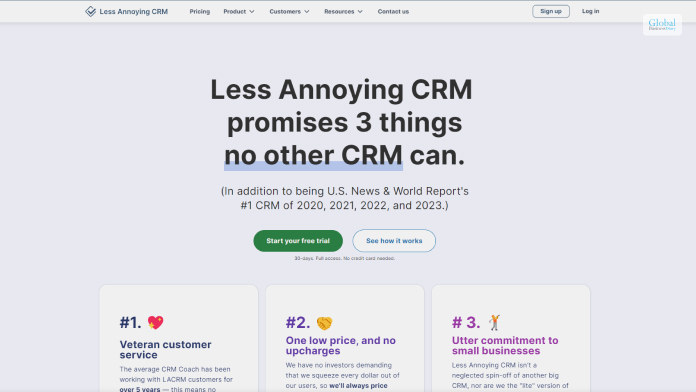
One of the first things that you see about Less Annoying CRM is that it is priced only at $15 per month. There is no extra pricing, and there is no other premium or free version. However, you might get a trial period at the start. No pricing tiers help to reduce the complexities of the software.
The CRM is one of the most flexible options that is available in the market. The CRM is mainly targeted toward small to medium-sized businesses and startups. The interface is simple but comprises a many features that are enough for a small business to use. Furthermore, the support from the platform is also quite great.
When it comes to lead management, the Less Annoying CRM software is one of the best you can have. According to their official website, “Our simple lead report shows you an always up-to-date list of every lead in your pipeline, including the status and priority of the lead, contact info, and the note from the last time you talked to them. Finally you can be sure that you and your team are following up with all of your leads.”
If you are looking for a high-performing CRM at an affordable price, then Less Annoying CRM is probably the best option for you, available online. Although it does not have the features available with Zoho CRM, it still stands out in terms of affordability and the features according to the price.
Read More: CRM software Monday: Features, Price, Pros & Cons of Monday Sales CRM
Why The Less Annoying CRM Is A Great Option For Small Businesses?
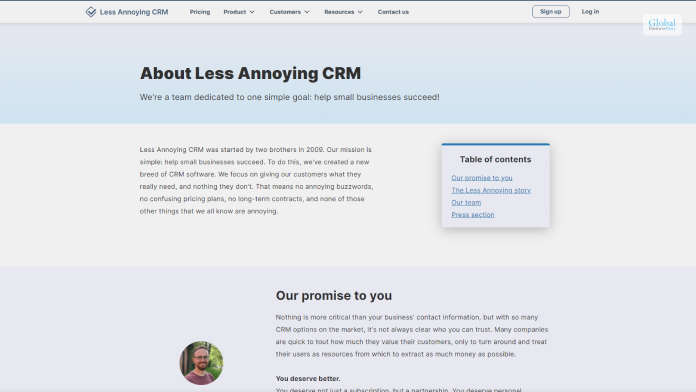
One of the best things about the Less Annoying CRM is that it enables easy collaboration between all the members of the company, as well as between the company and the clients.
According to the official website of Less Annoying CRM, “Add as many users from your company as you want for just $15/user/month. Each user has their own login and password, and you decide who has access to what. Whether you want your reps to only have access to their own data, or you want everyone to share, we make it easy.”
Other major factors that make Less Annoying CRM a great option for small and medium-sized businesses include its easy-to-use interface and simple setup features. With a little learning, anyone shall be able to use the software. It takes only a few minutes for a person to start using the software. Furthermore, if you are struggling to use it, there is outstanding customer support who is willing to help you anytime.
The Major Features Of Less Annoying CRM
A tech website named TrustRadius.com reviews Less Annoying CRM, as they add,
“It is designed for small business looking for a way to increase sales and get organized, but that find other CRMs on the market too complicated. Less Annoying CRM provides tools to track contacts, leads, and follow-ups without any of the extra clutter.”
Hence, you can understand that the developers tried to make the CRM more organized and simpler.
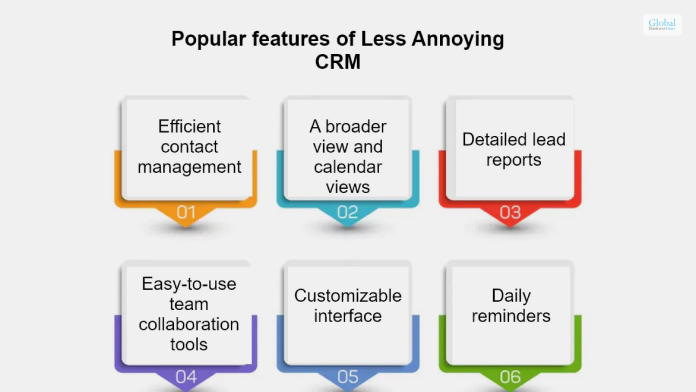
The following are the major features of Less Annoying CRM that your business shall benefit from:
- You will get all your contact information in one place, which is an essential demand for contact management.
- The calendar and tasks are simplified and kept together in one place for the whole team.
- Lead management is easier, as you can stop leads from slipping between the cracks.
- Collaboration with others within the company gets easier by a huge margin.
- There are a lot of customization features that can be done by anyone.
- You will be able to access information from any device.
The Essential Pros And Cons Associated With Less Annoying CRM

Every CRM software you will come across online has its own set of pros and cons. You will need to check whether the pros are good enough for your business and ensure that the cons cannot affect you. The following are some of the major pros and cons associated with Less Annoying CRM:
Pros
These are the essential pros of Less Annoying CRM that can help your business:
- The interface is interactive, intuitive, and simple. Recently, it was newly redesigned.
- There are a variety of help and support options from which you can benefit from.
- Ability to use it from mobile as well.
Cons
The following are some of the cons of Less Annoying CRM:
- It can be a bit difficult for an absolute beginner to learn.
- The new interface can even require a learning curve for existing users too.
- Some work is needed to upgrade the basic reporting features of the CRM.
Read More: Upwards Review: Is This India’s Best Instant Loan App?
Summing Up
Hope this article review was helpful for you in getting a better understanding of what the Less Annoying CRM software has to offer. It is good software and affordable simultaneously. The best part is that there is no complicated pricing, and also the features are kept fully simple. Furthermore, you will also get the required flexibility and performance, which will help you by providing extra value to your business. Do you think the Less Annoying CRM is a great option for a startup? Share your reviews about this CRM in the comments section below
Read More:
- StashFin Personal Loan Review – Interest Rates, Loan Amount, Eligibility, And More
- SmartCoin: Information, Eligibility Criteria, Interest Rates, Review & More
- LoanTap: Information, Eligibility Criteria, Interest Rates, Review & More
Tags:

Recent
Dinmukhamet Idrisov and a Gold-Mine Dispute From Kazakhstan’s Oligarchic Past
Oct 16, 2026

Memory Chips Are Becoming More Important in the AI Era
Aug 06, 2026

Why Enterprise Web Applications Still Choose Angular for Long-Term Growth
Aug 04, 2026

Due Diligence Decoded: Why Careful Evaluation Still Wins in Business
Jul 11, 2026

Related Articles

The Role Of Digital Agencies In Transforming Car Dealerships
Car dealerships, long identified by sprawling lots, vibrant banners, and the quintessential 'sales pitch', are undergoing a seismic shift, thanks to the rapid evolution of digital technology. As consumers' shopping habits gravitate more towards online platforms, the automotive industry finds itself at a crossroads, demanding a profound digital transition. Here’s where digital agencies specializing in automotive digital marketing solutions step in. They bridge the gap between traditional sales techniques and the demands of the digital consumer. So, let’s get started with this comprehensive guide, which explains the importance of digital marketing in car dealerships. It has a bunch of necessary insights for you, so keep reading. Digital Agency's Toolbox for Dealerships Whether you know it or not, most digital marketing agencies promote car dealerships among national and international clients. But which agency is the best for you? How do you discover that? Here are a few toolboxes that must be present at any digital firm for car dealerships: Building Robust Online Platforms: Gone are the days when a customer’s first interaction with a dealership was in-person. Today, a potential buyer starts their journey online. Digital agencies assist dealerships in creating user-friendly websites, offering detailed vehicle information, virtual showrooms, and even online purchasing gateways. Hence, the first thing you want to look at is the kind of platforms the agency is active on. There are millions out there that can and should be optimized for the best automotive deals. Why not make use of them? Creating robust online channels is the stepping stone for any digital firm. Data-Driven Personalization: Automotive digital marketing solutions revolve around leveraging data analytics. By understanding customer preferences, past behaviors, and browsing patterns, dealerships can offer tailored deals and promotions that resonate with individual consumers. Digital agencies utilize advanced Customer Relationship Management (CRM) systems to help dealerships craft these personalized marketing strategies. Fluff is something produced easily, but catching it is a big challenge. Therefore, search for companies that believe in data-driven personalization for your car dealership brand. Empowering the Shift to Electric: As dealerships expand their inventories to accommodate the rising demand for electric and hybrid vehicles, digital agencies play a pivotal role in marketing these vehicles to the eco-conscious buyer. They employ specialized campaigns highlighting the benefits of electric mobility, ensuring dealerships don’t just stock these vehicles but sell them effectively. Inspect what technological solutions the agency seeks. Do they use campaigns like PPC, SEO, and social media marketing to boost your car dealership strategy? If yes, then you can surely opt for them and, in fact, get more ideas on how to keep the process going. Elevating Customer Experience: Today’s consumer expects a seamless experience, both online and offline. Digital agencies help car dealerships integrate advanced tools, like video chat solutions, ensuring customers can engage with salespeople from the comfort of their homes. These tools not only offer convenience but help establish a trusted relationship between the buyer and the dealership. When the consumer experience is good, people will automatically want to be a part of your dealership plan. That’s how it works! Subscription & Mobility Solutions: Modern consumers are exploring alternatives to traditional car ownership. Recognizing this trend, digital agencies assist dealerships in setting up subscription or car-sharing platforms, appealing to a segment of the market that values flexibility over long-term commitment. If the digital company is already providing flexible solutions, there’s nothing to worry about. But what if they don’t? In such cases, make sure to communicate your needs well. When you partner alongside a different agency altogether, it is necessary to talk well and align both your plans strategically. Online Reputation Management: In an age where online reviews can make or break sales, maintaining a positive digital reputation is paramount. Digital agencies offer tools and strategies to help dealerships engage with customers, address concerns, and ensure a consistent flow of positive feedback. Use digital tools to maintain your car dealership brand’s online reputation. This can largely help you to reach an effective clientele and diminish the risks of potential damages. Strategic and Creative Thinking: One of the foremost things any digital agency should be well-equipped with is the ability to think creatively. There must be a plan of targeting clients in the best way possible because you don’t just want to target them but also convert them. Both creative and strategic thinking give a clear idea of opportunities and challenges the industry might be facing. Hence, opt for an agency that can think beyond the usual world and boost your car dealership business. Additionally, check out their portfolio and how they have managed clients in the past. Challenges and Solutions While the digital transformation journey promises immense opportunities, it's not devoid of challenges. Dealership staff, accustomed to traditional sales methods, might exhibit resistance to new digital tools. Digital agencies play a role in training and familiarizing these staff members, ensuring a smooth transition. Another significant concern is data security. With the escalating threats of cybercrimes, safeguarding customer data becomes imperative. Digital agencies equipped with expertise in cybersecurity can provide dealerships with solutions to protect sensitive information. Lastly, the financial and skill-based investment required for digital transformation can be daunting. However, with the right digital agency partnership, dealerships can optimize costs, leveraging the agency's expertise to deploy efficient automotive digital marketing solutions without the need to build in-house teams from scratch. Conclusion The car dealership landscape is undeniably changing, and the road ahead is digital. As dealerships navigate this new terrain, partnering with specialized digital agencies can offer them the tools, strategies, and expertise to not only adapt but thrive. In the age of online shopping, reviews, and instant gratification, it's these digital partnerships that will define the dealerships of the future. And it’s a wrap on this article. The car dealership is an emerging realm of the profession, and so is digital marketing. The amalgamation of both should have enormous benefits for you. Thank you for reading till the end. If you loved the article and have anything to share, comment below! Read Also: 6 Tips For Doing The Car Shipping To Georgia Process Right
Oct 31, 2023
What Is QuickBase? A Low-Code Database Platform For Citizen Developers
QuickBase is a great software platform that allows you to streamline the work related to business management, lead management, and resource management for better work processes. This software platform is a no-code platform where you can empower your business teams to create, modify, and customize applications despite not having major programming skills. In this article, you will learn some basic details about QuickBase, which you need to be aware of if you try to purchase the software for your business. In addition to the pricing of the software, you will also learn about the major features of the software platform, which you can find after your QuickBase Login. Hence, you shall find out whether this software is a good option for your business or not. Finally, we will discuss some of the major pros and cons of the software. Hence, to learn more about the software, read on through to the end of the article. QuickBase – What Is It All About? In the year 2022, Inc. Magazine named QuickBase as the Best in Business SaaS software. This tells you that the company has made a positive impact on society, the environment, communities, and industries. You will have better access to better information. Furthermore, automated workflows and access through permissions can help in enhancing security. According to the official website of QuickBase, “A big focus at QuickBase is how to create better connections. Between your people, among your systems and data, with partners and collaborators. And that connection can – and should – go even further when you are truly effective.” Basically, QuickBase allows you to get all aspects of your business operations in one place. This acts as a centralized system that everyone can access. On the other hand, you will also have a better idea of what is happening at every stage of the business organization. Once you start using QuickBase, there shall be less risk for your organization, and you will be able to reduce the amount of waste that your organization generates. This, in turn, can help you to cut down your costs, as you can connect the existing systems of your business with the key contributors. Read More: Zoho CRM – Best Features, Pricing, Pros, Cons, And Alternatives QuickBase Pricing Provided the types of functions that QuickBase offers for businesses, the price looks quite affordable. Furthermore, once you try to purchase the basic version of the app, you will be able to use the app for a period of thirty days as a trial, where you will get all the features available at higher levels. Here are the pricing levels of QuickBase: PlansPricingTeam$35 per user per month (annual billing) for a minimum of 20 usersBusiness$55 per user per month (annual billing) for a minimum of 40 usersEnterprise- Fully customizable software- Price as per the types of services availed.- For the whole enterprise and interconnected use cases. QuickBase – What Are The Major Features That It Offers? QuickBase helps you streamline the processes of the organization, and your teams can also improve their complex business application. Furthermore, here, you will not need to worry about the cost of traditional development, maintenance, and deployment of resources. Here are the major features: Project management Portfolio management Resource management Budget and Finance Contract management Work-order management Subcontractor management Reports and Analytics, and many more. Why Can QuickBase Be A Good Option For Your Business? As per the claims of QuickBase’s official website, “QuickBase helps your team mitigate risk, reduce waste, and cut down on unexpected costs by connecting your existing systems with key contributors. With automated workflows and granular permissions, the right people will have access to the right information every time.” Apart from that, there is also QuickBase Training which you can avail of to become an expert with the software. Once you start using the software at all levels for the business, it will help in simplifying the processes. It also comes with a variety of options for integrations as well, as you can connect with all the QuickBase software systems, as well as third-party systems. Essential Pros And Cons Of QuickBase Like every other software platform, QuickBase also comes with its own set of pros and cons that are essential for you to know. The following are the major pros and cons that you will need to know about QuickBase: Pros Of QuickBase Here are the major pros of QuickBase, which shall surely benefit your business processes: The platform has very proactive and outgoing product support. There is a large user community forum, which is brisk. Here, you will be able to learn a lot about the software and clear your doubts as well. There are many customization options that allow you to personalize the software based on the needs and demands of the business. The reporting and analytic functions are plenty, and they are powerful as well. Such features can help you to make data-driven decisions for your organizations. There are plenty of integration possibilities with third-party applications as well. There are a variety of permission levels that can enable you to maintain better control of your business. Cons Of QuickBase The following are some of the cons of QuickBase which you need to be aware of if you are thinking about making a purchase: The software has many features and can get complicated in certain cases. Hence, there is a steep learning curve at the start. The mobile app is not so great and lacks functionalities and features. The budget and financial management tools are limited. There are some problems with the tables, as retrieving data can be difficult. If you want a summary of configuration information, it is not possible. Creating dynamic forms is complicated. Read More: Freshworks – Best Features, Pricing, Pros, And Cons: Let’s Discuss Summing Up Hope this article was helpful for you to find out whether QuickBase is a good option for your business or not. We think it is. If yours is a small business, this is great software to manage your business processes easily. What are your own reviews about the software? Share with us in the comments section below. Read Also: Leadfeeder 2023 Costs, Specifications, Evaluations, And Alternatives Creatio CRM – Review, Major Features, Pros & Cons, And More What Is Salesforce Sales Cloud? – Let’s Find Out In Details
Jul 18, 2023

Choosing The Right Internet Service For Your Business: A Strategic Guide
In the ever-evolving realm of current enterprise, the choice of a web service provider (ISP) can be a make-or-destroy choice. The digital age needs now not simply connectivity but a reliable and robust internet connection to fuel communique, collaboration, and common productivity. This complete guide ambitions to delve deeper into the decision-making method, presenting strategic insights into key considerations that may manual you toward choosing a web provider that seamlessly aligns with your enterprise wishes. I. Assessing Business Needs The initial step on this adventure entails a meticulous assessment of your business desires. The length of your agency, the range of customers, and the intricacies of your online sports form the muse of this evaluation. Understanding the nuances of your usage patterns allows for a tailor-made method, making sure that the chosen internet plan is precisely attuned to the precise demands of your business operations. Ii. Types Of Internet Services The panorama of internet offerings is huge, imparting a diverse array of options, every with its own set of benefits and boundaries. This phase gives a detailed exploration of conventional Digital Subscriber Line (DSL) and cable services, together with present-day Fiber-optic and satellite TV for PC options. Recognizing the precise characteristics of every empowers agencies to make informed decisions based not only on their operational needs but also on geographic concerns. Iii. Internet Speed Requirements In the era of rapid records, the velocity of your net connection is an important element that can't be understated. Different enterprise sports demand varying ranges of velocity, making it crucial to align your chosen velocity with your particular operational wishes. Whether your commercial enterprise mainly includes ordinary email communique, bandwidth-intensive video conferencing, or common big statistics transfers, ensuring that your preferred speed meets and exceeds those necessities is paramount for premier performance. Iv. Reliability And Uptime Guarantees In the quick-paced and interconnected global of business, downtime isn't always simply inconvenient; it interprets to misplaced opportunities and sales. Reliability and uptime guarantees out of your ISP become important considerations. This segment sheds light on the importance of uninterrupted service for seamless commercial enterprise operations, customer interactions, and common productivity. Businesses are advised to research the recognition of ISPs regarding provider interruptions and their responsiveness to technical problems, making sure a steadfast internet connection. V. Scalability And Future-Proofing Businesses are dynamic entities, concerned with increase and evolution. Consequently, your preferred internet service needs to be scalable, seamlessly growing alongside your commercial enterprise. This phase delves into the importance of destiny-proofing your connectivity, allowing for elevated bandwidth wishes, and adapting to technological improvements without causing disruptions in your operations. An ahead-looking method ensures that your net service remains in sync along with your evolving enterprise necessities. Vi. Contract Terms And Service Level Agreements (SLAs) Navigating the intricacies of provider contracts and Service Level Agreements (SLAs) is an essential thing of the selection-making system. This segment emphasizes the significance of scrutinizing agreement phrases to keep away from unexpected fees and making sure that your commercial enterprise gets the promised stage of service. Additionally, it underscores the role of SLAs in ensuring the great reliability of your internet connection. Clear information on contractual obligations empowers businesses to make informed decisions aligned with their financial and operational desires. Vii. Customer Support And Technical Assistance In the area of technology, hiccups are inevitable. When they arise, efficient customer service will become the lifeline for businesses. This segment underscores the significance of responsive customer service and informed technical assistance. It guides agencies to inquire approximately the provision of assist channels, reaction instances, and the expertise of the help team. Ensuring that help is with ease available when wanted isn't always only a comfort; it's a vital element in retaining uninterrupted business operations. Conclusion In the end, the choice to pick out the proper internet provider for your commercial enterprise is a multifaceted and strategic one that demands cautious consideration of different factors. From information on your specific wishes and exploring the specific styles of services to prioritizing reliability, scalability, and customer support, this large guide equips agencies to navigate the complex panorama of ISPs. By making knowledgeable choices, agencies cannot only set up a robust online presence that meets modern requirements but also set the foundation for increase and achievement in the virtual era. When it involves the Internet for business, a nicely informed choice isn't simply a choice; it's the key to seamless connectivity and superior operational efficiency. Read Also: What Is Network Marketing And How To Do It Why Create A Powerful Business Continuity Plan? How To Start A Business In 2021 – Best Business Strategies
Jan 11, 2024

Importance Of Law Firm Website Design
In today's digital age, having a well-designed website is crucial for any law firm. A professionally designed website not only enhances the online presence of a law firm but also helps in attracting potential clients and establishing credibility. Here are some key reasons why law firm website design is important: 1. First Impression: Your website is often the first point of contact for potential clients. A visually appealing and user-friendly website creates a positive first impression and instills confidence in visitors. It reflects the professionalism and expertise of your law firm. 2. Branding: A well-designed website allows you to showcase your law firm's unique brand identity. It should incorporate your logo, color scheme, and overall aesthetic to create a cohesive and memorable brand image. Consistent branding across your website helps in building recognition and trust among clients. 3. User Experience: A user-friendly website is essential for providing a seamless browsing experience to visitors. Easy navigation, clear layout, and intuitive design make it effortless for users to find the information they need. A positive user experience encourages visitors to stay longer on your website and increases the chances of them contacting your law firm. 4. Mobile Responsiveness: With the increasing use of smartphones and tablets, it is crucial for your website to be mobile-responsive. A mobile-friendly design ensures that your website looks and functions well on different devices, providing a consistent experience to users. It also improves your website's visibility in search engine rankings. 5. SEO or Search Engine Optimization: A well-designed website incorporates SEO best practices to improve its visibility in SERPs. This includes optimizing page titles and meta descriptions and using relevant keywords throughout the content. A higher ranking in search results increases the chances of potential clients finding your law firm online. Professional Law Firm Website Design Services When it comes to designing a website for your law firm, it's crucial to seek the assistance of professionals who specialize in law firm website design services. These experts have the knowledge and experience to create a visually appealing and functional website that accurately represents your law firm's brand and services. Professional web design agencies or freelancers who specialize in law firm website design understand the unique needs and requirements of the legal industry. They have the expertise to create a website that not only looks great but also functions seamlessly, providing a user-friendly experience for your potential clients. These professionals will work closely with you to understand your law firm's goals, target audience, and overall branding. They will then use this information to design a website that reflects your firm's values and effectively communicates your services to potential clients. Law firm website design services typically include various elements such as responsive design, intuitive navigation, and compelling content. Responsive design ensures that your website looks and functions well on different devices, including desktops, tablets, and smartphones. Intuitive navigation makes it easy for visitors to find the information they need while compelling content engages and informs potential clients about your legal expertise. By investing in professional law firm website design services, you can ensure that your website stands out from the competition and effectively showcases your law firm's unique qualities. A well-designed website not only attracts potential clients but also builds trust and credibility in your legal services. To find the right professionals for your law firm's website design, consider researching and comparing different web design agencies or freelancers. Look for portfolios and client testimonials to get an idea of their previous work and client satisfaction. Additionally, consider reaching out to other law firms for recommendations or referrals. Remember, your law firm's website is often the first impression potential clients have of your firm. By investing in professional website design services, you can create a strong online presence that sets your law firm apart and attracts the clients you desire. Best Practices and Tips for Law Firm Website Design When it comes to designing a website for your law firm, there are some best practices and tips that can help you create an effective online presence. Here are some key considerations to keep in mind: 1. User-friendly navigation: Your site must have a clear as well as intuitive navigation menu and should allow visitors to navigate the information they are looking for easily. Organize your content into logical categories and use descriptive labels for your menu items. 2. Mobile responsiveness: With the increasing use of smartphones and tablets, it is crucial that your website is mobile-friendly. Make sure your website design is responsive, meaning it adapts to different screen sizes and resolutions, providing a seamless user experience across devices. 3. Clear and concise content: Your website's content should be written in a clear and concise manner, avoiding legal jargon that may confuse visitors. Use headings, bullet points, and short paragraphs to make your content scannable and easy to read. 4. Call-to-action buttons: Include prominent call-to-action buttons throughout your website to encourage visitors to take the desired action, such as contacting your law firm or scheduling a consultation. Use clear and compelling language to entice users to take the next step. 5. Visual appeal: A visually appealing website can leave a lasting impression on visitors. Use high-quality images, professional graphics, and a consistent color scheme that aligns with your law firm's branding. Avoid cluttered designs and choose a clean and modern layout. 6. SEO: Optimize your website for search engines through the incorporation of relevant keywords in your content, headings as well as meta tags. This eventually helps improve the website's visibility in search engine results and drives organic traffic to the website. 7. Testimonials and reviews: Displaying testimonials and reviews from satisfied clients can help build trust and credibility. Include these on your website to showcase your law firm's expertise and success stories. By following these best practices and tips, you can create a law firm website that not only looks professional but also effectively communicates your brand and services to potential clients. Remember to regularly update your website with fresh content and stay up-to-date with the latest web design trends to stay ahead of the competition. Best Practices and Tips for Law Firm Website Design When it comes to designing a website for your law firm, there are some best practices and tips that can help you create a user-friendly and effective online presence. Here are some key considerations to keep in mind: 1. Clear and intuitive navigation: Your website should have a clear and intuitive navigation menu that allows visitors to easily find the information they are looking for. Organize your content into logical categories and use descriptive labels for your menu items. 2. Mobile responsiveness: With the increasing use of smartphones and tablets, it is crucial that your website is mobile-responsive. This means that it should adapt to different screen sizes and provide a seamless browsing experience for mobile users. 3. Engaging and informative content: Your website should provide valuable and informative content that addresses the needs and concerns of your target audience. This can include blog posts, articles, FAQs, and resources that showcase your expertise and establish your law firm as a trusted authority. 4. Professional design and branding: Your website should have a professional and visually appealing design that reflects your law firm's brand identity. Use high-quality images, consistent color schemes, and fonts that are easy to read. Incorporate your law firm's logo and ensure that your website design aligns with your overall branding strategy. 5. Contact information and call-to-action: Make it easy for visitors to contact your law firm by prominently displaying your contact information on every page of your website. Include a clear call-to-action that encourages visitors to reach out for a consultation or to schedule an appointment. 6. Search engine optimization or SEO: Make your website optimized for search engines. For this purpose, you will need to incorporate relevant keywords in your content, headings along with meta titles. This eventually helps drive organic traffic to your site and boost the website's visibility in relevant search engine results. Conclusion By following these best practices and tips, you can create a law firm website that not only looks professional but also effectively communicates your expertise and services to potential clients. Remember to regularly update and maintain your website to ensure that it remains current and relevant in the ever-evolving digital landscape. Read Also: How To Build An Ecommerce Website To Boost Your Business Matrix Organizational Structure – What Are Its Pros And Cons? Comparing SMS And MMS Messaging: Which Is Right For Your Campaign?
Sep 16, 2023