





What Is LeadSquared? Features, Pricing, Pros, And Cons
LeadSquared is a popular customer acquisition platform that encompasses both the features that are available in CRMs and Marketing Automation software. Once you implement it, with the help of this platform, you will be able to integrate the sales and marketing teams in the same place.
With the help of this software, your business can be able to capture leads, nurture them, and perform processes related to lead management, sales management, marketing analytics, etc.
In this article, you will come across a general review of the platform named LeadSquared. Apart from that, you will also learn why this software platform can be a great addition to your business. In addition to that, we will also include what are the major features that this software platform brings to the table and how it can benefit your business. Finally, we will discuss the major pros and cons of the software. Hence, to learn comprehensively about the software read on through to the end of the article.
LeadSquared – A General Review Of The Software

LeadSquared is a platform that brings you a variety of software services that include Sales CRM, Marketing Automation, Mobile CRM, Customer Portal, Performance Management, API, and more. However, for this article, the focus will be only on Sales CRM and Marketing Automa
According to LeadSquared,
“There are multiple sales journeys, involving different channels, processes, teams, and touchpoints. LeadSquared connects them all – processes, distributed teams, and touchpoints – to give you one complete end-to-end sales execution platform – for your digital teams, call center agents, feet-on-street teams (sales, partner onboarding, service), and operations.”
LeadSquared Unicorn claims to simplify the processes so that the team focuses on the next task and thinks of enhancing their efficiency to make more sales. The same is true for the marketing automation software services that LeadSquared offers. Here, you will be able to track all the actions of your prospects and all the conversation they delve into with your team.
One of the best things about LeadSquared is that it offers a useful and simple CRM that is quickly becoming one of the favorite marketing and sales tools for businesses throughout the world. The CRM also includes many features and is built in such a way as to handle a lot of users, activities, and leads at the same time. It is one of the best choices for startups and small businesses which are on the verge of growth.
Read More: CRM software Monday: Features, Price, Pros & Cons of Monday Sales CRM
LeadSquared – Pricing

The pricing of LeadSquared makes it one of the best choices for small and medium-sized businesses as well as startups.
Sales CRM + Mobile CRM Plans:
| Plans | Pricing |
|---|---|
| LITE | $25 per user/month (annual billing) |
| PRO | $50 per user/month (annual billing) |
| SUPER | $100 per user/month (annual billing) |
Marketing Automation Plans:
| Plans | Pricing |
|---|---|
| ESSENTIAL | $150 per month (annual billing) |
| BASIC | $400 per month (annual billing) |
| STANDARD | $1200 per month (annual billing) |
| ENTERPRISE | $2500 per month (annual billing) |
Why LeadSquared Is A Great Software For Your Business?
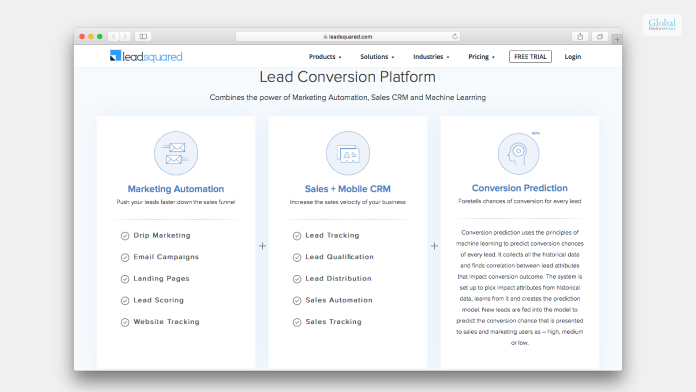
One of the best things about LeadSquared is that it offers businesses a simple CRM and software service for a better experience and fast work processes. According to a review by GetApp.com,
“LeadSquared also comes with powerful integrations with other business tools to ensure a seamless experience. Recently, they have also built a developer platform, where you can design and write custom code which can be used to build custom business logic.”
LeadSquared is a cloud-based platform and can run with the most common operating systems, no matter which device you are using at the moment. Whether you are looking for lead management, marketing automation, and sales acceleration, LeadSquared can help you in all these regards.
The software lets you capture leads from most of the sources that help in lead generation. Furthermore, with the landing page builder of the software, one can create and customize landing pages. You can also choose from a wide variety of templates.
Some Of The Major Features Of LeadSquared That Can Help Your Business
The following are some of the most important features that the LeadSquared software platform offers you once you do a LeadSquared login:
1. Automation Of Lead Capture And Management Processes
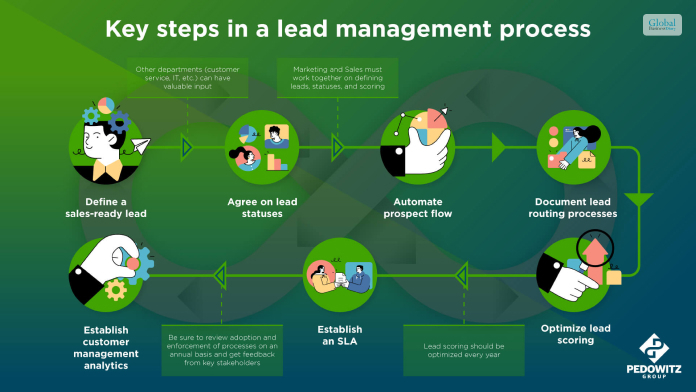
The software offers mobile responsive landing pages that help the organization increase traffic. Apart from that, you can use various website widgets that can help you to generate more leads. With a variety of inbuilt features, capturing leads will become seamless for you.
2. Marketing Automation Of Marketing Processes

With the help of drip marketing, you will be able to engage and sell more. Furthermore, there are also options for you to segment your lists of contacts based on lead scores, lead nurturing, location, behavior, and more. The software also lets you share personalized content with your leads and customers through the use of messaging and email.
3. Accelerating And Boosting Sales

According to the official website of LeadSquared, you can
“Capture leads from all your channels automatically, manage them intelligently, transfer them to the right teams (and people). Ensure zero lead leakage and zero missed opportunities.”
The lead scoring feature also lets you identify your prospects faster. Furthermore, there are behavioral insights related to each prospect as well.
Essential Pros And Cons Of LeadSquared

The following are the major pros and cons of the LeadSquared software platform:
Pros
Here are the pros of LeadSquared:
- Protection of sensitive data
- No lead leakage
- Better engagement of leads
- Clear views and record of the activity history
- Full record and performance of sales and marketing
Cons
Here are the cons of LeadSquared:
- Lack of stability in the portal
- Unnecessary delays sometimes
- Slow response from the customer service
Read More: Less Annoying CRM – Pricing, Features, Pros And Cons, And More
Summing Up
Hope this article was helpful for you in getting a better idea of the LeadSquared Sales CRM and Marketing Automation software. If you think the features that this software offers are exactly what you need, then you must consider purchasing the software. Apart from that, you must also check the pricing and find out which one suits the best for you and your organization. Do you think that LeadSquared can make a difference in your business with its features? Share your reviews with us in the comments section below.
Read Also:
Tags:

Recent
Memory Chips Are Becoming More Important in the AI Era
Aug 06, 2026

Why Enterprise Web Applications Still Choose Angular for Long-Term Growth
Aug 04, 2026

Due Diligence Decoded: Why Careful Evaluation Still Wins in Business
Jul 11, 2026

How Hydraulic System Design Impacts Equipment Performance
Jul 01, 2026

Related Articles
Hatchbuck – Pricing, Features, Pros And Cons, And More
Hatchbuck or BenchmarkONE is a software that offers you CRM features as well as integrated marketing automation. It is a popular marketing automation and customer acquisition app like LeadSquared. With the help of this software, you will have the option to maintain existing customers and also deal with prospective customers. In this article, we will discuss mainly Hatchbuck, which is one of the best software options for marketing automation, lead management, email marketing, and more. You will also learn whether this software is a good addition to your business processes or not. Finally, we will discuss some of the major features of the software, along with its pros and cons. Hence, to learn more about this amazing software, read on through to the end of the article. Hatchbuck CRM – What Is Hatchbuck? Apart from offering you software for email marketing, marketing automation, and lead management, Hatchbuck also offers a CRM to track customers and maintain and develop relationships with them. One of the best things about Hatchbuck is that it is easy to learn and basic to use. There is hardly any need for a learning curve if you want to use the software. Benchmark Hatchbuck is now known as BenchmarkONE. According to the official website, “BenchmarkONE is sales and marketing software for small businesses and marketing agencies. We help agencies and small business owners propel relationships into sales with all-in-one CRM and marketing automation. Cut through the clutter and complexity of bulky tools with a simple, affordable platform made for you.” As you can see, Hatchbuck is specifically created to meet the needs of small businesses, especially the ones that are on the verge of growth. The best part is that it is a meagre-risk option that is available at a low price. This factor in itself is a great thing for a small business. Read More: Less Annoying CRM – Pricing, Features, Pros And Cons, And More Hatchbuck – Is It A Good Option For Your Business? Hatchbuck, also known as BenchmarkONE, is one of the best CRM software platforms for small businesses that are looking to improve their sales and automate their marketing support. If you are looking for software available at a relatively low price, then this is the best option for you. Once you make a Hatchbuck login, you will be amazed to see a many features available with it. MotleyFool.com reviews the system – “The solution offers an abundance of marketing and sales automation at a relatively low price, which makes Hatchbuck a great first system for small business marketing professionals and more novice marketing technology users.” Furthermore, there is also a Hatchbuck mobile app, which allows you to connect to the software platform from your phone if you are in a remote area or on the move. Although it does not come with some advanced tools needed for marketing, it easily integrates with some of the major advanced marketing tool platforms. Hatchbuck – Price And Plans The following are the pricing options available with Hatchbuck: Plan NamePriceSmall Biz$99 per month (billed every six months)Team$199 per month (billed every six months)Professional$299 per month (billed every six months) You will also get a 14-day trial before you decide to purchase the software platform for your business. The Major Features Of Hatchbuck Hatchbuck comes with plenty of features, given its price range. According to TechnologyAdvice.com, “Hatchbuck combines CRM functions along with marketing and sales functions that provides a simple and affordable way to manage contacts and follow-ups in a seamless automated process to boost capabilities, drive higher marketing response rates, and increase sales.” Hence, you can see how Hatchbuck is a great option for small businesses that are in their growth phase. The following are some of the major features of Hatchbuck from which you can benefit: 1. The lead management capabilities of Hatchbuck include information such as lead scoring, automated response, and behavioral analysis. You can also organize your contacts amazingly through this platform. 2. One of the best features of Hatchbuck CRM is pipeline management. With this, you will be able to gain more insights into the performance of sales and the achievement of goals. 3. Apart from creating, testing, delivering, and analysis of emails, you will be able to get real-time information on the result of email marketing. 4. The automation capabilities of Hatchbuck when it comes to email management are also several. You can also monitor the activities of the leads when it comes to emails. 5. There are many analytic features that Hatchbuck brings with it. It provides full graphical representation and data related to email performance and sales. Although the attribution reporting needs more revision, the developers need to work more on this. Essential Pros And Cons Of Hatchbuck The following are the major pros and cons of the Hatchbuck platform that will help you to decide whether this software platform is a good option for your business or not: Pros Of Hatchbuck Here are the major pros of Hatchbuck: The automation features are many. The software is effortless to use and has a simple interface. You get a free trial before you decide to make a purchase. The pricing is quite low compared to other similar software platforms. Cons Of Hatchbuck Here are the major cons of Hatchbuck: Lack of journey-building tools, which is a big issue. The landing pages are rigid and sometimes fail to load. Absence of advanced features and attribution capabilities. Read More: CRM software Monday: Features, Price, Pros & Cons of Monday Sales CRM Summing Up Hope this article was helpful for you in getting a better idea of the usefulness of Hatchbuck or BenchmarkONE. This is a great option for your business if you are looking for numerous features at a low price. Although this platform has some limitations that make it not a good option for growing business, it can still be a great option for a small and growing business. But, as you grow, you might have to look for pricier options. Do you know of other similar software platforms within the same price range? Share your reviews about them in the comments section below. Read More: Upwards Review: Is This India’s Best Instant Loan App? Fullerton India Review: Things To Know Before Taking A Loan! LoanTap: Information, Eligibility Criteria, Interest Rates, Review & More
Jun 14, 2023

Measurement And Monitoring Solution Of Oil Storage Tank
Just recently, there were only a few ways of measuring the levels of oil storage tanks, such as visual checks and by use of a dipstick. Nevertheless, these procedures were slow, inaccurate, and not in real-time. The era has changed with the advent of liquid-level transmitters to monitor oil storage tanks. Oil storage tanks have been hugely impacted by the emergence of liquid-level transmitters. These devices present real-time data that is both accurate and dependable. Furthermore, it has become possible to remotely determine whether oil levels are appropriate as well as detect leakage points. They have increased efficiency in operations, minimized human errors, and enhanced safety at oil storage facilities. Advise Measuring And Monitoring Solutions For Oil Storage Tanks There are many considerations you need to make before deciding on which level sensor to use for your tank filled with petroleum fuel: accuracy, reliability, longevity, and conformance with industry standards. But let’s move on; how do you optimize them? 1.Ensure Correct Installation: However, when one wants to maximize the performance over these devices as well as increase the accuracy levels, it is good to strictly adhere to what the manufacturers say during installation. 2.Calibration and Maintenance: Regular calibration of the liquid level transmitter is done to ensure accuracy is maintained. Also, routine maintenance checks are carried out to ascertain that the device is functioning smoothly and prevent potential issues. 3.Monitoring System Integration: Integrate the liquid-level transmitter with a comprehensive monitoring system for real-time data monitoring, alarms, and alerts. This will enable proactive decision-making, prevention maintenance, and enhanced general efficiency. 4. Consider External Factors: While choosing a liquid-level transmitter, consider external factors like temperature, pressure, environmental conditions, and hazardous zone requirements. Ensure it can withstand and operate effectively within your oil storage facility’s specific conditions. Solutions For Measuring And Monitoring Of Oil Storage Tank Now, let us discuss three highly recommended liquid-level transmitters for measuring and monitoring solutions for oil storage tanks: MPM489W Liquid Level Transmitter The Microsensor MPM489W Level Transmitter is a highly advanced and adaptable instrument designed for several industrial applications. It has an integrated structure which means no further adjustments are needed, streamlining field service and automation control. The transmitter has certifications for intrinsic safety type (Ex ia IIC T6 Ga) and explosion-proof type (Ex d IIC T6 Gb) to ensure safe operation in dangerous environments. The MPM489W is a fully sealed submersible design that makes it durable and hence suitable for use in high strength stainless steel housing with liquids compatible with the same. It also ensures long-term sensor service given its tight seal between the cable and housing. Additionally, it has a dedicated circuit together with a piezoresistive sensing element that is known for their stability and reliability thus contributing to product accuracy and repeatable performance. The transmitter covers an extensive measurement range from 0mH2O to 200mH2O, with overpressure protection up to 2 times FS. Accuracy specifications are quite impressive as they range from ±1%FS at lower pressure values (0mH2O – 1mH2O) to ±0.25%FS at higher pressure values (10mH2O – 200 mH2O). Also, it meets the test standard of GB/T 17614.1-2015/IEC60770-1:2010, which reflects its commitment to quality. The operating temperature range of the MPM489W allows it to be used in different environments: -10℃ to 60℃ (intrinsic safe type), -20℃ to 70℃ (cable material: PE, PVC) and –20℃ to 80℃ (cable material: PUR). It has a storage temperature range of -20℃ to 85℃, a vibration resistance rating of 10g(55Hz~2000Hz), and a shock resistance rating of 100g for an impulse duration of 11ms. This MPM489W has an IP68 protection rating that ensures its resilience against dust and water ingress, making it suitable for use in challenging industrial environments. The thermal drift specifications are outstanding, with small values implying minimal influence on accuracy at different temperatures. It also has various output signal options like 4mA20mA, 1V5V DC, 0V5V DC, 0V10V DC, which can be used in a wider range of control systems. Read Also: The Evolution Of IT: Understanding The Role Of Managed Support In London MPM426W Series Submersible Level Transmitters The MPM426W series submersible level transmitters are designed to be versatile and reliable for various applications by incorporating a sturdy construction and extensive features. The transmitters come with a fully welded body that guarantees their endurance in severe working conditions, including those requiring high resistance to wear and tear, or even explosive zones. They also consume less power, thus leading to energy saving while having a large temperature range of operation which enables them to adapt to different environmental conditions. What makes these transmitters unique is their ability to measure levels in diverse categories of storage tanks such as processing oils like gasoline and diesel among other chemicals like methanol, ethanol, DEF, etc. This feature is complemented by integrated temperature measurement which makes them appropriate for situations where varying degrees of heat are important. In addition, there are multiple output signals and a magnetic end cap for movable tanks that make them much more flexible and user-friendly. The MPM426W series accuracy floor is well pronounced going by the pressure types/ range which ranges from ±0.25%FS TO ±1%FS. They are fitted with IP68 rated protection making them resistant against water and dust hence they can be used as submersibles. Moreover, due to their approval for use in hazardous areas, it is clear that they prioritize safety. In general, the MPM426W series is a reliable and versatile solution for level monitoring across industries as well as its precision, durability and adaptability in harsh operational environments. Conclusion So that’s all about the measurement and monitoring solution of the oil storage tank. Anything involving fluids or oils needs to be taken seriously. That is, in terms of safety, efficiency, and reliability. All the transmitters we discussed above are key to enhancing these aspects. Even so, they work best when used in consideration of the tips discussed earlier. Read Also: Top Florida-Based Software For Audit Management Equity Theory: A Balancing Act For Modern Workplaces Unleashing The Power Of Azure Integrated Services For Enhanced Cloud Capabilities
Dec 16, 2023
The AI Revolution: How Industries Are Driving Innovation?
It feels like we blinked and suddenly AI is no longer a mere hype. Now, it is stitched into the way businesses breathe and move. What was once sci-fi chatter now sits in boardrooms. In fact, it shapes decisions, nudges customer interactions, and quietly rewrites the rules of competition. Companies do not merely want efficiency. Rather, they look for fewer errors, more speed, and better precision. Hence, either you adopt or risk falling behind. This urgency is reshaping entire industries faster than most leaders expected. Healthcare Shifts Whether it is hospitals, clinics, or even small practices, algorithms are everywhere. This enables early detection and more accurate diagnoses. Also, doctors rely on data sets so massive they would drown without AI sorting through them. Moreover, those insights help generate treatment plans that feel tailored rather than generic. As a result, patient flow becomes smoother. Also, administrative burdens become lighter and surgical precision gets better through tools that do not tire or lose focus. Read also: How AI Is Quietly Reshaping Pharmaceutical Manufacturing Retail in Motion Shopping is no longer just shopping, but is quite predictive and curated. Retailers use AI to guess what shelves should hold before customers even walk in, and online recommendations pop up as they know you better than you know yourself. Inventory shortages shrink, trends are mapped in real time, and customers expect it now. Moreover, retail leaders keep investing, and the bar keeps rising, reshaping what “good service” even means. Predict inventory shifts before they happen Suggest products based on browsing behavior Reduce wasted stock and missed sales Map demand patterns with greater accuracy Finance Under Watch Money moves fast, risk moves faster, and AI steps in to keep pace. AI also helps to scan transactions in real time. Also, if there are suspicious blips, they are easier to flag before damage spreads. Moreover, advisors rely on AI-generated insights. These include the following: Market patterns Portfolio tweaks Risk assessments. As a result, confidence grows because decisions feel less like guesswork. This way, firms operate quickly, steadily, and with stronger security. Education Rewired Classrooms no longer look the same. This is because adaptive platforms adjust lessons midstream, nudging students forward at their own pace, while teachers breathe easier with grading automated, freeing time for actual teaching. Planning the Path Of course, implementation takes thought, patience, and structure. Moreover, generative AI training matters. Also, data protection is not optional, and departments must collaborate. Hence, it is best to start small and expand slowly. In fact, organizations that pace themselves find adoption smoother, less disruptive, and more sustainable. Key Considerations Invest in generative AI training for teams Build strong data protection frameworks Encourage cross-department collaboration Choose scalable tools that grow with the organization Pilot projects before full-scale rollouts Think of the Bigger Picture! This is not just about tech adoption. Rather, it is about how organizations define innovation itself. In fact, AI is not a shortcut, but a shift in mindset. So, companies that step in with intention will ride the wave instead of being swept up by it. No matter what sector you are in, the future tilts toward those who blend smart tools with thoughtful execution. The story of AI is no longer about possibility. Rather, it is about inevitability. Moreover, the organizations that embrace it with care and clarity will set the pace for others. Read Also: AI for finance and Financial Markets: Let’s Explore A Comprehensive Guide To AI in Contract Management
Nov 20, 2025

how Cloud-Based Management Software Enhances Team Collaboration For HR Managers Who Work Remotely
Remote work has completely transformed the way industries operate, and Human Resources (HR) is no exception. HR managers find themselves at the forefront of a paradigm shift in how teams collaborate and thrive. As the traditional office space gives way to dispersed virtual environments, the need for seamless and efficient communication becomes paramount. Enter the game-changer: cloud-based management software. What Is Cloud-Based Management Software? Cloud-based HR manager software, or Software as a Service (SaaS), refers to tools and platforms that enable users to access, store, and manage data remotely through the Internet. These innovative systems operate on a subscription model, offering organizations enhanced flexibility and scalability to meet their evolving needs. With cloud-based management software, HR managers can streamline various tasks, including efficient recruitment processes, seamless onboarding experiences, effective performance management, and fostering employee engagement. Remote Work And HR Management The concept of remote work has gained significant traction in recent years, particularly with the rise of technologies that enable teams to collaborate virtually. As HR managers navigate this new era, they face unique challenges, such as maintaining employee engagement and monitoring performance from a distance. This shift in work dynamics has led to the demand for innovative solutions to address these challenges effectively. In response to this need, cloud-based management software has emerged as a game-changer. Cloud-based management tools provide HR managers with accessible, scalable, and secure solutions, empowering them to easily work remotely. Imagine being able to access your work from anywhere, at any time, and on any device with an internet connection. This level of flexibility ensures that remote HR teams can seamlessly continue operations, no matter the time zone or geographical constraints they face. With the rise of remote work, these tools have become indispensable in managing and tracking employee data, facilitating communication, streamlining workflows, and so much more. Streamlined Team Communication Cloud-based management software revolutionizes the way teams collaborate by enabling real-time collaboration through shared databases. This powerful feature not only facilitates quick and efficient access to information for team members but also enhances the overall productivity and efficiency of the team. With the ability to leverage cloud-based tools, HR managers can effortlessly stay updated on critical tasks and seamlessly share data with their team members in real time. This streamlined communication process is particularly advantageous for remote teams, as it eliminates the need for constant back-and-forth emails and minimizes potential miscommunication, leading to smoother workflows and improved team cohesion. Embracing cloud-based management software empowers teams to work more seamlessly together, fostering greater collaboration and ultimately driving better outcomes for the organization as a whole. Centralized Employee Data Management One of HR managers' most significant challenges working remotely is efficiently managing employee data. This includes storing and organizing information and ensuring its accessibility and security. Using cloud-based management software, all employee data is securely stored in a centralized database that can be accessed by authorized team members from anywhere. This feature eliminates the need for physical files and in-person meetings, making tracking and analyzing employee performance, leaves, benefits, and other critical data easier. Additionally, the software provides advanced data management capabilities, such as automated notifications and reminders, customizable reports, and seamless integration with other HR systems. These added features enhance efficiency and streamline HR processes, enabling HR managers to focus on strategic initiatives and employee engagement, even while working remotely. Enhanced Workflow Automation HR teams, with their multitude of tasks, often find themselves juggling multiple responsibilities simultaneously. However, the advent of cloud-based management tools has brought forth a new era of efficiency and accuracy. Take, for instance, the process of employee onboarding. Using automated workflows, team members can be promptly notified of upcoming tasks and deadlines, ensuring a seamless and error-free onboarding experience. This not only reduces potential delays but also minimizes the risk of any errors creeping into the process. Collaboration In Real-Time With the implementation of cloud-based management software, HR managers can effortlessly collaborate with their teams and seamlessly work on projects in real-time. This groundbreaking feature eliminates the need for constant back-and-forth communication via email or phone calls. It empowers team members to simultaneously view, edit, and provide valuable comments on documents while ensuring version control. As a result, productivity is significantly enhanced by streamlining communication and eradicating any potential delays caused by waiting for responses. The efficiency and effectiveness of the workflow are optimized, allowing for a more seamless and productive work environment. Data Analytics For Informed Decision-Making Cloud-based management software empowers HR managers with valuable insights through robust data analytics. They can gain a comprehensive view of workforce trends, employee performance, and engagement metrics. This centralized data collection from various HR processes allows for a holistic understanding of the remote team's dynamics. With this in-depth knowledge, HR managers can make informed decisions that contribute to the team's overall success well-being, and productivity. Final Thoughts Remote work is here to stay, and with it comes the need for efficient collaboration tools. For HR managers, cloud-based management software offers versatile solutions to streamline processes and enhance teamwork. As the remote work trend continues to grow, HR teams need to embrace these tools to stay ahead of the curve and maximize their potential in managing remote employees. With the right cloud-based management software, HR managers can effectively manage teams and improve efficiency and productivity while adapting to the ever-changing landscape of remote work. If you are an HR manager looking to enhance team collaboration remotely, consider using cloud-based management tools today! Read Also: Top Signs Your Boss Is Threatened By You Effective Ways To Track Your Employees’ Work Is Natural Gas Distribution A Good Career Path?
Dec 18, 2023