





What Is LeadSquared? Features, Pricing, Pros, And Cons
LeadSquared is a popular customer acquisition platform that encompasses both the features that are available in CRMs and Marketing Automation software. Once you implement it, with the help of this platform, you will be able to integrate the sales and marketing teams in the same place.
With the help of this software, your business can be able to capture leads, nurture them, and perform processes related to lead management, sales management, marketing analytics, etc.
In this article, you will come across a general review of the platform named LeadSquared. Apart from that, you will also learn why this software platform can be a great addition to your business. In addition to that, we will also include what are the major features that this software platform brings to the table and how it can benefit your business. Finally, we will discuss the major pros and cons of the software. Hence, to learn comprehensively about the software read on through to the end of the article.
LeadSquared – A General Review Of The Software

LeadSquared is a platform that brings you a variety of software services that include Sales CRM, Marketing Automation, Mobile CRM, Customer Portal, Performance Management, API, and more. However, for this article, the focus will be only on Sales CRM and Marketing Automa
According to LeadSquared,
“There are multiple sales journeys, involving different channels, processes, teams, and touchpoints. LeadSquared connects them all – processes, distributed teams, and touchpoints – to give you one complete end-to-end sales execution platform – for your digital teams, call center agents, feet-on-street teams (sales, partner onboarding, service), and operations.”
LeadSquared Unicorn claims to simplify the processes so that the team focuses on the next task and thinks of enhancing their efficiency to make more sales. The same is true for the marketing automation software services that LeadSquared offers. Here, you will be able to track all the actions of your prospects and all the conversation they delve into with your team.
One of the best things about LeadSquared is that it offers a useful and simple CRM that is quickly becoming one of the favorite marketing and sales tools for businesses throughout the world. The CRM also includes many features and is built in such a way as to handle a lot of users, activities, and leads at the same time. It is one of the best choices for startups and small businesses which are on the verge of growth.
Read More: CRM software Monday: Features, Price, Pros & Cons of Monday Sales CRM
LeadSquared – Pricing

The pricing of LeadSquared makes it one of the best choices for small and medium-sized businesses as well as startups.
Sales CRM + Mobile CRM Plans:
| Plans | Pricing |
|---|---|
| LITE | $25 per user/month (annual billing) |
| PRO | $50 per user/month (annual billing) |
| SUPER | $100 per user/month (annual billing) |
Marketing Automation Plans:
| Plans | Pricing |
|---|---|
| ESSENTIAL | $150 per month (annual billing) |
| BASIC | $400 per month (annual billing) |
| STANDARD | $1200 per month (annual billing) |
| ENTERPRISE | $2500 per month (annual billing) |
Why LeadSquared Is A Great Software For Your Business?
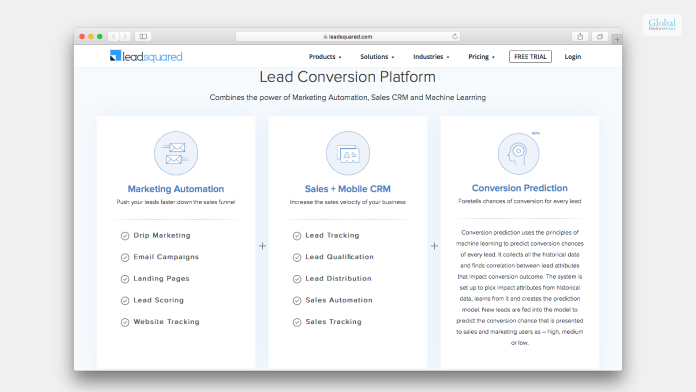
One of the best things about LeadSquared is that it offers businesses a simple CRM and software service for a better experience and fast work processes. According to a review by GetApp.com,
“LeadSquared also comes with powerful integrations with other business tools to ensure a seamless experience. Recently, they have also built a developer platform, where you can design and write custom code which can be used to build custom business logic.”
LeadSquared is a cloud-based platform and can run with the most common operating systems, no matter which device you are using at the moment. Whether you are looking for lead management, marketing automation, and sales acceleration, LeadSquared can help you in all these regards.
The software lets you capture leads from most of the sources that help in lead generation. Furthermore, with the landing page builder of the software, one can create and customize landing pages. You can also choose from a wide variety of templates.
Some Of The Major Features Of LeadSquared That Can Help Your Business
The following are some of the most important features that the LeadSquared software platform offers you once you do a LeadSquared login:
1. Automation Of Lead Capture And Management Processes
The software offers mobile responsive landing pages that help the organization increase traffic. Apart from that, you can use various website widgets that can help you to generate more leads. With a variety of inbuilt features, capturing leads will become seamless for you.
2. Marketing Automation Of Marketing Processes

With the help of drip marketing, you will be able to engage and sell more. Furthermore, there are also options for you to segment your lists of contacts based on lead scores, lead nurturing, location, behavior, and more. The software also lets you share personalized content with your leads and customers through the use of messaging and email.
3. Accelerating And Boosting Sales

According to the official website of LeadSquared, you can
“Capture leads from all your channels automatically, manage them intelligently, transfer them to the right teams (and people). Ensure zero lead leakage and zero missed opportunities.”
The lead scoring feature also lets you identify your prospects faster. Furthermore, there are behavioral insights related to each prospect as well.
Essential Pros And Cons Of LeadSquared

The following are the major pros and cons of the LeadSquared software platform:
Pros
Here are the pros of LeadSquared:
- Protection of sensitive data
- No lead leakage
- Better engagement of leads
- Clear views and record of the activity history
- Full record and performance of sales and marketing
Cons
Here are the cons of LeadSquared:
- Lack of stability in the portal
- Unnecessary delays sometimes
- Slow response from the customer service
Read More: Less Annoying CRM – Pricing, Features, Pros And Cons, And More
Summing Up
Hope this article was helpful for you in getting a better idea of the LeadSquared Sales CRM and Marketing Automation software. If you think the features that this software offers are exactly what you need, then you must consider purchasing the software. Apart from that, you must also check the pricing and find out which one suits the best for you and your organization. Do you think that LeadSquared can make a difference in your business with its features? Share your reviews with us in the comments section below.
Read Also:
Tags:

Recent
Memory Chips Are Becoming More Important in the AI Era
Aug 06, 2026

Why Enterprise Web Applications Still Choose Angular for Long-Term Growth
Aug 04, 2026

Due Diligence Decoded: Why Careful Evaluation Still Wins in Business
Jul 11, 2026

How Hydraulic System Design Impacts Equipment Performance
Jul 01, 2026

Related Articles

Beyond Stickies: Innovative Note-Taking Apps For Mac Enthusiasts
Apple’s humble Stickies application has served Mac users well. It has allowed users to quickly record an idea, save essential details, create a reminder, or keep critical information visible on the screen while they work. Although it does the job, the Stickies app may feel clumsy because it is a decade-old application that hasn’t received any significant updates in recent years. Therefore, it is natural for Mac users to feel they deserve more, and they do. Fortunately, there’s a vibrant ecosystem of note-taking applications waiting to be explored. You don’t have to singularly rely on Stickies to ignite your creativity and streamline your workflow. Let’s take a look into a world beyond Stickies. Unclutter Do you want a personal productivity sidekick? Unclutter comes to mind. It lends a hand without getting in the way. You can stick the notes above the desktop and access them whenever you want with a single gesture. If you need to revisit something you had copied a while ago, you can dip into the Clipboard History. With Unclutter’s Quick Notes, you can instantly jot down something that is going on in your mind or something you heard during a meeting without opening a full-fledged text editor. There’s also the File Hub for all those random files that keep multiplying on your desktop. Hence, you don’t have to frantically search for them anymore. Post-It Post-It is another popular sticky notes application that gives competition to Apple’s Stickies. This software has got your back, whether you are great at collaboration and teamwork or need a push for your to-dos. With this application, you can maintain your momentum while working or distance learning as a student. The software is capable of generating ideas with coworkers or organizing homework for your teachers. You can even create eye-catching, vibrant calendars and give them to your friends. To make the note interactive, you can add photos. When it comes to sharing, this software gets along with everyone. You can export all your notes without a fuss to your preferred cloud services or third-party programs, such as iCloud, Trello, Miro, etc. Bear Do you love the elegance of plain text but want richer formatting? This is where Bear comes to the rescue. This is a stunning application that harnesses the power of Markdown. It allows users to style their notes with simple, effortless keystrokes. You can create nested lists, drag and drop pictures, and even embed code snippets with a lot of ease. The user-friendly, minimalist interface and dark theme of Bear offer a distraction-free zone for crafting code, prose, or anything that comes to your mind. Whether you are a programmer conjuring algorithms or a novelist weaving intricate thoughts and worlds, Bear can be your trusted sidekick. Ulysses Are you a long-form writing enthusiast? When it comes to crafting prose, Ulysses is your best friend. This is a user-friendly, elegant application offering distraction-free writing modes. It provides focus goals so you can stay on track. Also, the app comes packed with organizational tools so you can structure your next magnum opus. Sheets is a fascinating feature of Ulysses that helps break down one’s writing into easily readable, manageable chunks. There’s the goal board that keeps the vision front and center so users never feel lost in their mission. With Ulysses, you can instantly say goodbye to all the clunky word processors and enjoy the minimalist beauty of this application. Allow your words to flow freely! Evernote Does Evernote need an introduction? This has become one of the most widely used note-taking applications in recent years. The latest iteration of the application deserves a standing ovation because it has reinvented itself by offering robust organizational tools and a sleek interface. The app even allows for cross-platform syncing. Within the expansive world of Evernote, you can create to-do lists, capture audio notes, scan documents, and clip web pages. The application is ideal for professionals, students, and anyone juggling several projects simultaneously. Read Also: Higher Education And Business Triumph: What’s The Connection? Obsidian Obsidian is more than a note-taking application. It is a knowledge palace that is waiting to be built. The mind-blowing application leverages linking notes to create a web of interconnected ideas. Although each note has a separate identity, they can be seamlessly connected to each other through bi-directional links. The links can be discovered visually. The application is ideal for students, researchers, and anyone who loves mapping out complicated ideas and forging intellectual connections. Notability Notability is another excellent application for Mac users. But it is not merely a note-taking application. The tool captures the entire thought process. It seamlessly blends typed text, sketches, handwritten notes, pictures, and even audio recordings in a single note. Users can unleash their creative side by importing web pages, annotating PDFs, and doodle diagrams. Conclusion So, these are some popular note-taking applications you can consider if you are seeking something better than Stickies. Read Also: The Resources You Need To Start Your Business How To Start A Business In 2021 – Best Business Strategies Everything Any Entrepreneur Needs To Know Before Starting A Business
Jan 31, 2024

How To Improve Energy Efficiency In Your Data Centre
As data centres continue to grow in size and complexity, it's become increasingly important to focus on energy efficiency. There are a number of ways to improve energy efficiency in your data centre, which can have a big impact on both your bottom line and the environment. In this blog post, we'll explore some of the most effective ways to improve energy efficiency in your data centre. By implementing these best practices, you can make a real difference in your data centre's energy consumption. Let's get started! Understand How Your Data Centre Uses Energy Gaining an understanding of how your data centre uses energy is essential for ensuring that it runs effectively and efficiently. By routinely tracking the power consumption of your servers and other devices within your data centre, you can begin to identify where potential improvements can be made in terms of energy efficiency. Additionally, it is worth looking into how different cooling strategies, such as liquid cooling, or revised ventilation systems may help reduce the amount of energy consumed by your data centre overall. To make sure you get the most out of this process though be sure to seek advice from subject matter experts and seek out solutions through research that are tailored to your unique environment. Evaluate Your Data Centre’s Energy Usage Keeping tabs on the energy usage of your data centre is essential for maintaining efficient operations. It's important to regularly evaluate the power, cooling, and ventilation protocols to ensure they are all optimized. If these systems aren't working in harmony, it could increase operational costs as well as put stress on equipment that could lead to unexpected downtime. To make sure everything is running smoothly, consider hiring an external auditor to conduct an energy audit of your data centre in order to identify any areas of improvement and locate potential cost savings. Doing so can help you not only boost the efficiency of your data centre but also save money and reduce your environmental footprint. Improve Data Centre Efficiency Data centres process crucial information for technology companies, yet their efforts to improve energy efficiency are often overlooked. Implementing small changes to infrastructure and power delivery can significantly reduce the amount of energy consumed. Power management systems should be properly set up, and nonessential components such as memory and controllers should be deactivated. Additionally, ensuring proper ventilation with fans and cooling systems can help mitigate the inefficiencies of around-the-clock computing power. Finally, opt to find electricity rates that fit your needs or utilize renewable sources such as solar and wind to reduce overall electrical consumption. With these changes in place, data centres can drastically improve their overall energy efficiency levels, greatly reducing operational costs in the long run. Monitor Energy Usage Monitoring the energy usage of your data centre is essential when making changes. Keeping tabs on things like power consumption and temperature variations provides an opportunity to make accurate adjustments that enable efficient resource management, helping you save costs over time. Staying up-to-date with knowledge about current energy levels gives you a head start when it comes to identifying areas for improvement and makes it easier to implement negative for positive change. To maximize performance, the process of monitoring how much energy is being used should be done regularly and consistently. Adjust For Efficiency Taking steps for data centre infrastructure solutions can help reduce costs and improve the environment. To capitalize on those results, facility managers should continuously adjust their approaches - examine current practices, utilize new technologies or techniques as they become available, measure and monitor power, cooling, and operations, and rethink how all of these components can work together for improved performance. Implementing these changes will not only give your data centre a more efficient infrastructure but could also add up to big savings in the long run. Ultimately, taking action now to adjust the data centre towards greater energy efficiency will pay dividends well into the future. Conclusion Implementing these changes to increase energy efficiency in your data centre doesn't have to be overwhelming. Start by learning as much as you can about how your data centre uses energy and evaluate what methods can be used to improve it. Remember to always stay mindful of the changes being made and how they're impacting energy usage. Also, monitor the data centre after the changes are made to see firsthand the impact of energy efficiency improvements. Finally, continuously adjust your strategy as needed, so that you'll remain on top of any additional gains in energy efficiency that can be made. With dedication and thoughtfulness, you'll be able to create an efficient and optimized data centre that saves energy! Read Also: Top 7 Part-Time Work From Home Jobs Top 5 Types Of Business That Are Giving More Profits To The Sellers What Is A Business Development Consultant, And What Are Their Job Roles?
Feb 25, 2023

how Cloud-Based Management Software Enhances Team Collaboration For HR Managers Who Work Remotely
Remote work has completely transformed the way industries operate, and Human Resources (HR) is no exception. HR managers find themselves at the forefront of a paradigm shift in how teams collaborate and thrive. As the traditional office space gives way to dispersed virtual environments, the need for seamless and efficient communication becomes paramount. Enter the game-changer: cloud-based management software. What Is Cloud-Based Management Software? Cloud-based HR manager software, or Software as a Service (SaaS), refers to tools and platforms that enable users to access, store, and manage data remotely through the Internet. These innovative systems operate on a subscription model, offering organizations enhanced flexibility and scalability to meet their evolving needs. With cloud-based management software, HR managers can streamline various tasks, including efficient recruitment processes, seamless onboarding experiences, effective performance management, and fostering employee engagement. Remote Work And HR Management The concept of remote work has gained significant traction in recent years, particularly with the rise of technologies that enable teams to collaborate virtually. As HR managers navigate this new era, they face unique challenges, such as maintaining employee engagement and monitoring performance from a distance. This shift in work dynamics has led to the demand for innovative solutions to address these challenges effectively. In response to this need, cloud-based management software has emerged as a game-changer. Cloud-based management tools provide HR managers with accessible, scalable, and secure solutions, empowering them to easily work remotely. Imagine being able to access your work from anywhere, at any time, and on any device with an internet connection. This level of flexibility ensures that remote HR teams can seamlessly continue operations, no matter the time zone or geographical constraints they face. With the rise of remote work, these tools have become indispensable in managing and tracking employee data, facilitating communication, streamlining workflows, and so much more. Streamlined Team Communication Cloud-based management software revolutionizes the way teams collaborate by enabling real-time collaboration through shared databases. This powerful feature not only facilitates quick and efficient access to information for team members but also enhances the overall productivity and efficiency of the team. With the ability to leverage cloud-based tools, HR managers can effortlessly stay updated on critical tasks and seamlessly share data with their team members in real time. This streamlined communication process is particularly advantageous for remote teams, as it eliminates the need for constant back-and-forth emails and minimizes potential miscommunication, leading to smoother workflows and improved team cohesion. Embracing cloud-based management software empowers teams to work more seamlessly together, fostering greater collaboration and ultimately driving better outcomes for the organization as a whole. Centralized Employee Data Management One of HR managers' most significant challenges working remotely is efficiently managing employee data. This includes storing and organizing information and ensuring its accessibility and security. Using cloud-based management software, all employee data is securely stored in a centralized database that can be accessed by authorized team members from anywhere. This feature eliminates the need for physical files and in-person meetings, making tracking and analyzing employee performance, leaves, benefits, and other critical data easier. Additionally, the software provides advanced data management capabilities, such as automated notifications and reminders, customizable reports, and seamless integration with other HR systems. These added features enhance efficiency and streamline HR processes, enabling HR managers to focus on strategic initiatives and employee engagement, even while working remotely. Enhanced Workflow Automation HR teams, with their multitude of tasks, often find themselves juggling multiple responsibilities simultaneously. However, the advent of cloud-based management tools has brought forth a new era of efficiency and accuracy. Take, for instance, the process of employee onboarding. Using automated workflows, team members can be promptly notified of upcoming tasks and deadlines, ensuring a seamless and error-free onboarding experience. This not only reduces potential delays but also minimizes the risk of any errors creeping into the process. Collaboration In Real-Time With the implementation of cloud-based management software, HR managers can effortlessly collaborate with their teams and seamlessly work on projects in real-time. This groundbreaking feature eliminates the need for constant back-and-forth communication via email or phone calls. It empowers team members to simultaneously view, edit, and provide valuable comments on documents while ensuring version control. As a result, productivity is significantly enhanced by streamlining communication and eradicating any potential delays caused by waiting for responses. The efficiency and effectiveness of the workflow are optimized, allowing for a more seamless and productive work environment. Data Analytics For Informed Decision-Making Cloud-based management software empowers HR managers with valuable insights through robust data analytics. They can gain a comprehensive view of workforce trends, employee performance, and engagement metrics. This centralized data collection from various HR processes allows for a holistic understanding of the remote team's dynamics. With this in-depth knowledge, HR managers can make informed decisions that contribute to the team's overall success well-being, and productivity. Final Thoughts Remote work is here to stay, and with it comes the need for efficient collaboration tools. For HR managers, cloud-based management software offers versatile solutions to streamline processes and enhance teamwork. As the remote work trend continues to grow, HR teams need to embrace these tools to stay ahead of the curve and maximize their potential in managing remote employees. With the right cloud-based management software, HR managers can effectively manage teams and improve efficiency and productivity while adapting to the ever-changing landscape of remote work. If you are an HR manager looking to enhance team collaboration remotely, consider using cloud-based management tools today! Read Also: Top Signs Your Boss Is Threatened By You Effective Ways To Track Your Employees’ Work Is Natural Gas Distribution A Good Career Path?
Dec 18, 2023

Memory Chips Are Becoming More Important in the AI Era
Artificial intelligence is transforming the way - Businesses operate Researchers solve complex problems Consumers interact with technology. At the outset, AI applications require enormous computing power. This extends far beyond powerful processors. The same is true for advanced language models and autonomous systems. In fact, behind every successful AI system lies memory chips. Although this critical component receives less attention, it plays an equally important role. Now, AI models are growing in size and sophistication. So, there is a demand for faster, more efficient memory solutions. Moreover, organizations developing AI infrastructure are investing heavily in technologies that - Reduce latency Improve processing efficiency Handle increasingly massive datasets. Therefore, it is important to understand why memory chips have become central to AI innovation. This way, you will get a better idea of the future of the technology industry. AI Workloads Depend on Fast and Efficient Memory To be honest, artificial intelligence systems process extraordinary amounts of information. This is true for both training machine learning models and running real-time inference. In fact, AI hardware constantly moves data between processors and memory. If that flow slows down, overall performance suffers. This happens regardless of how powerful the processor is. Moreover, industry experts and semiconductor researchers recognize memory bandwidth as a defining factor in AI performance. Basically, high-performance computing environments require highly capable memory. It has to transfer large volumes of data rapidly. Meanwhile, it must maintain low power consumption. As AI applications become increasingly sophisticated, memory architecture is necessary for processing capability. Essentially, modern AI infrastructure relies on several types of memory: This includes - DRAM High-bandwidth memory (HBM) NAND flash storage. Each serves a different purpose within AI systems. They provide immediate access to training data. Also, they store massive datasets for future analysis. The growing complexity of these workloads continues to increase demand for advanced memory technologies. High-Bandwidth Memory Is Reshaping AI Infrastructure Recently, there have been multiple semiconductor innovations. Among them, high-bandwidth memory (HBM) has become one of the biggest developments for AI hardware. HBM does not work like conventional memory designs. Rather, it stacks multiple memory layers vertically. This allows dramatically faster communication with processors. Meanwhile, it also helps improve energy efficiency. Moreover, leading chip manufacturers are incorporating HBM into - Graphics processors AI accelerators. This is because today's machine learning models require continuous access to vast amounts of data. This design helps in the following manner: Reduces bottlenecks Enables more efficient model training. This increasingly enables the deployment of AI solutions that process complex datasets every day. It is particularly helpful for large language models and advanced generative AI systems. Investors following semiconductor trends mostly monitor developments in memory manufacturers alongside GPU producers. In fact, there have been many market discussions surrounding the Micron share price. They frequently reflect broader expectations regarding - AI infrastructure spending Data centre expansion Demand for advanced memory products, as organizations scale AI capabilities worldwide. Data Centres Are Driving Unprecedented Memory Demand In the last few years, cloud computing has faced rapid expansion. This significantly increased the need for memory chips. Basically, every AI service offered through the cloud relies on data centers. These data centers are filled with - Servers equipped with advanced processors Substantial memory capacity to deliver fast, reliable performance. Technology companies are investing billions in AI-ready infrastructure. This helps to meet growing enterprise demand. Meanwhile, industry analysts regularly observe that each new generation of AI servers requires substantially more memory than traditional computing systems. This is beneficial for manufacturers. They can produce high-performance memory at scale. However, they must maintain consistent quality. Enterprise Adoption Enterprise adoption of AI extends well beyond technology companies. The following entities are deploying AI solutions to process complex datasets every day: Healthcare organizations Financial institutions Manufacturers Retailers Scientific research facilities In fact, more industries are integrating machine learning into routine operations. So, demand for reliable memory components continues to expand across global markets. Memory Innovation Supports More Sustainable Computing When it comes to AI infrastructure, energy efficiency has become a major priority. For instance, training advanced AI models requires substantial electricity. This makes hardware optimization essential. This helps reduce operational costs and environmental impact. Moreover, memory improvements play a major role in achieving these efficiency gains. In fact, semiconductor manufacturers continue developing memory solutions. They transfer data more efficiently. However, they consume less power. Now, engineers are carrying out the following functions: Refining manufacturing processes Improving chip architectures Increasing storage density. This delivers greater performance without proportional increases in energy usage. These innovations help organizations manage growing computational demands more responsibly. Many entities broadly agree that hardware efficiency will remain essential as AI adoption expands. These include: Academic researchers Engineering organizations Semiconductor industry leaders. In fact, improvements in memory technology increase processing speed. Also, it contributes to more sustainable computing environments. These are capable of supporting future AI growth without excessive energy consumption. Memory Chips Are the Future! Artificial intelligence may capture headlines through powerful software and groundbreaking applications. However, its continued success depends on the hardware working behind the scenes. Basically, memory chips provide - Speed Capacity Efficiency. This helps keep sophisticated AI systems running smoothly. Now, demand for intelligent computing is rising. So, memory technology will remain one of the industry's most valuable foundations. Therefore, businesses, investors, and technology professionals must understand the growing role of memory chips. It offers a clearer perspective on where AI infrastructure is headed. In fact, innovation will continue in semiconductor design. This will improve computing performance. Moreover, it will enable the next generation of intelligent systems. Those systems will shape industries and everyday life for years to come. Read Also: Transforming Fund Management: How AI Is Shaping the Future of Investing
Aug 06, 2026