





Hatchbuck – Pricing, Features, Pros And Cons, And More
Hatchbuck or BenchmarkONE is a software that offers you CRM features as well as integrated marketing automation. It is a popular marketing automation and customer acquisition app like LeadSquared. With the help of this software, you will have the option to maintain existing customers and also deal with prospective customers.
In this article, we will discuss mainly Hatchbuck, which is one of the best software options for marketing automation, lead management, email marketing, and more. You will also learn whether this software is a good addition to your business processes or not. Finally, we will discuss some of the major features of the software, along with its pros and cons. Hence, to learn more about this amazing software, read on through to the end of the article.
Hatchbuck CRM – What Is Hatchbuck?

Apart from offering you software for email marketing, marketing automation, and lead management, Hatchbuck also offers a CRM to track customers and maintain and develop relationships with them. One of the best things about Hatchbuck is that it is easy to learn and basic to use. There is hardly any need for a learning curve if you want to use the software.
Benchmark Hatchbuck is now known as BenchmarkONE. According to the official website,
“BenchmarkONE is sales and marketing software for small businesses and marketing agencies. We help agencies and small business owners propel relationships into sales with all-in-one CRM and marketing automation. Cut through the clutter and complexity of bulky tools with a simple, affordable platform made for you.”
As you can see, Hatchbuck is specifically created to meet the needs of small businesses, especially the ones that are on the verge of growth. The best part is that it is a meagre-risk option that is available at a low price. This factor in itself is a great thing for a small business.
Read More: Less Annoying CRM – Pricing, Features, Pros And Cons, And More
Hatchbuck – Is It A Good Option For Your Business?
Hatchbuck, also known as BenchmarkONE, is one of the best CRM software platforms for small businesses that are looking to improve their sales and automate their marketing support. If you are looking for software available at a relatively low price, then this is the best option for you.
Once you make a Hatchbuck login, you will be amazed to see a many features available with it. MotleyFool.com reviews the system – “The solution offers an abundance of marketing and sales automation at a relatively low price, which makes Hatchbuck a great first system for small business marketing professionals and more novice marketing technology users.”
Furthermore, there is also a Hatchbuck mobile app, which allows you to connect to the software platform from your phone if you are in a remote area or on the move. Although it does not come with some advanced tools needed for marketing, it easily integrates with some of the major advanced marketing tool platforms.
Hatchbuck – Price And Plans

The following are the pricing options available with Hatchbuck:
| Plan Name | Price |
|---|---|
| Small Biz | $99 per month (billed every six months) |
| Team | $199 per month (billed every six months) |
| Professional | $299 per month (billed every six months) |
You will also get a 14-day trial before you decide to purchase the software platform for your business.
The Major Features Of Hatchbuck
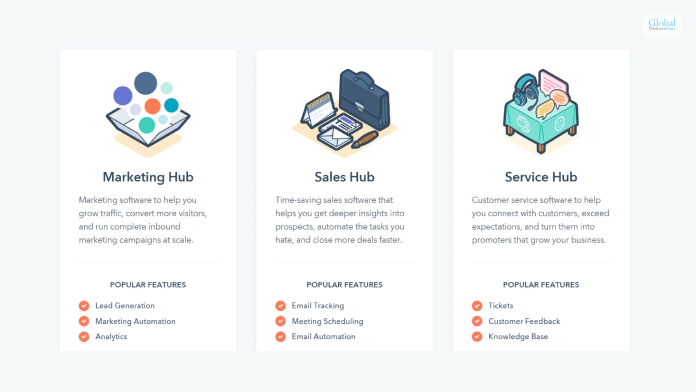
Hatchbuck comes with plenty of features, given its price range. According to TechnologyAdvice.com,
“Hatchbuck combines CRM functions along with marketing and sales functions that provides a simple and affordable way to manage contacts and follow-ups in a seamless automated process to boost capabilities, drive higher marketing response rates, and increase sales.”
Hence, you can see how Hatchbuck is a great option for small businesses that are in their growth phase.
The following are some of the major features of Hatchbuck from which you can benefit:
1. The lead management capabilities of Hatchbuck include information such as lead scoring, automated response, and behavioral analysis. You can also organize your contacts amazingly through this platform.
2. One of the best features of Hatchbuck CRM is pipeline management. With this, you will be able to gain more insights into the performance of sales and the achievement of goals.
3. Apart from creating, testing, delivering, and analysis of emails, you will be able to get real-time information on the result of email marketing.
4. The automation capabilities of Hatchbuck when it comes to email management are also several. You can also monitor the activities of the leads when it comes to emails.
5. There are many analytic features that Hatchbuck brings with it. It provides full graphical representation and data related to email performance and sales. Although the attribution reporting needs more revision, the developers need to work more on this.
Essential Pros And Cons Of Hatchbuck

The following are the major pros and cons of the Hatchbuck platform that will help you to decide whether this software platform is a good option for your business or not:
Pros Of Hatchbuck
Here are the major pros of Hatchbuck:
- The automation features are many.
- The software is effortless to use and has a simple interface.
- You get a free trial before you decide to make a purchase.
- The pricing is quite low compared to other similar software platforms.
Cons Of Hatchbuck
Here are the major cons of Hatchbuck:
- Lack of journey-building tools, which is a big issue.
- The landing pages are rigid and sometimes fail to load.
- Absence of advanced features and attribution capabilities.
Read More: CRM software Monday: Features, Price, Pros & Cons of Monday Sales CRM
Summing Up
Hope this article was helpful for you in getting a better idea of the usefulness of Hatchbuck or BenchmarkONE. This is a great option for your business if you are looking for numerous features at a low price. Although this platform has some limitations that make it not a good option for growing business, it can still be a great option for a small and growing business. But, as you grow, you might have to look for pricier options. Do you know of other similar software platforms within the same price range? Share your reviews about them in the comments section below.
Read More:
Tags:

Recent
Memory Chips Are Becoming More Important in the AI Era
Aug 06, 2026

Why Enterprise Web Applications Still Choose Angular for Long-Term Growth
Aug 04, 2026

Due Diligence Decoded: Why Careful Evaluation Still Wins in Business
Jul 11, 2026

How Hydraulic System Design Impacts Equipment Performance
Jul 01, 2026

Related Articles

Keeping Tabs On Someone’s Instagram Activity
Instagram has become one of the most popular social media platforms, with over a billion monthly active users. With its focus on visual content like photos and videos, Instagram offers insight into someone's life and connections. This has led some people to want to know how to see someone's activity on Instagram, whether it's their children, partner, or employees. However, Instagram doesn't have built-in tools to allow you to view private accounts or someone's activity directly. Morplabs you will find many useful tips on how to use Instagram! Using Third-Party Apps There are various third-party applications available on the market that can assist you in monitoring someone's Instagram activities more comprehensively. These apps provide a plethora of features beyond simply tracking posts and stories. They can allow you to view all the likes and comments made by the user, as well as the content they interact with. Some apps even provide comprehensive analytics on the user's activities. Powerful Features Phone monitoring apps give you the ability to see someone's Instagram activity. Once installed on their phone, the app captures real-time activity and gives you an overview and tools to analyze: Messages in Instagram DM as well as other apps: This feature allows users to send and receive messages through direct messaging on Instagram and other applications. Location history based on device GPS: With this feature, the device's GPS is used to track and store the user's location history, providing information about the places they have been. Screenshots to see exact content being viewed: By taking screenshots, users can capture and save the exact content they are viewing on their devices, allowing them to reference or share it later to track someone's Instagram activity. Full analytics for accounts followed, unfollowed, searched, etc.: This feature provides comprehensive analytics and insights regarding the accounts that a user follows, unfollows, searches, and interacts with. It offers valuable information about user behavior and preferences. You can check in at any time via a secure online dashboard that syncs all your device activity. Advanced features like keyword alerts can also automatically notify you if an activity of interest occurs. https://xrcollaboration.com/ is dedicated to the topic of apps like this! Using Profile Information If the account you want to monitor is public, you can simply go to their profile page and scroll through their posts and Stories. This will give you the ability to monitor Instagram activity. You can see who they follow and who follows them. You can also check if they have recently liked or commented on posts. However, if the account is private, you won't be able to access any of their content unless you follow each other. The profile page of a private account only displays their bio, profile photo, and number of posts. Enabling Post Notifications Another basic way to keep updated on someone's Instagram activity is to turn on post notifications for their account. Here's how: Go to their profile page Tap the bell icon next to the Following/Message button Select See First under Posts Now, whenever they share a new post or Story, you'll receive a notification. This ensures you see their activity in real time. The drawback of this way how to track an Instagram account is that post notifications only alert you to new content, not who they follow, message, or interact with. There's also no history or analytics. Related: Inzfy: How To Effectively Use Instagram Business Profile? Alternative Approaches If phone monitoring apps don't fit your comfort level or situation, simpler approaches can still help you loosely track someone's Instagram activity. Occasionally Checking In Rather than constant monitoring, you can manually inspect their profile page and posts every now and then. Look for new followers, engagement spikes, tagged photos, captions mentioning locations/people, etc. Cross-reference with their followers and who they follow for more context. While this method to track someone's Instagram activity lacks automation, and you might miss some things between checks, it gets the job done without any apps. Asking Directly Another low-tech option is to directly ask the person about their Instagram activity. Frame it as taking an interest in what they've been posting, who they chat with, the content they find funny, etc. Let them voluntarily show you their feed or recap recent interactions. Not only does this build trust and transparency, but it's a good way to start an open conversation about any social media concerns you might have as a parent or partner. Ethical Concerns Related To Instagram Profiles It goes without saying that Instagram has very quickly gathered popularity, especially among the youth. But with all the glamour that comes with likes, Instagram has its share of darker sides too. Various tools on this social marketing platform must be used ethically and users must be aware of it: Privacy Concerns A significant ethical concern revolves around the user’s privacy. The platform has been specifically designed to be personal, and users should be able to control who can access their profile. When using Instagram viewer tools to stalk private stories or photos without consent, they are most likely to violate their privacy. This ultimately ends up making the user feel uncomfortable, and they are likely to report these accounts. Legalities Related To Instagram Viewing When it comes to the Instagram viewing community, there is a list of legal considerations. Instagram has its own terms of service, which prohibits users from disrupting tools or programs. Violating these terms of service can lead to suspension of your account and might even cause legal action. Parting Words: Stay Safe On Instagram! When you monitor Instagram activity, the goal isn't usually to punish or control their behavior. Rather, it stems from general concern around safety and wellbeing. Issues like cyberbullying, predatory messaging, or oversharing personal details are what parents and partners hope to guard against. That's why clear communication, consent, and setting boundaries are so important with any monitoring approach. At the end of the day, regularly talking about what constitutes responsible use is the best way to enhance Instagram safety. Understanding each other's perspective allows you to jointly address problems as soon as they arise. Read Also: How To Run A Social Media Campaign At A Low Budget For An Aspiring Entrepreneur? What Are Social Media Apis And Why Do They Matter? How To Get A Mortgage As A Small Business Owner
Dec 26, 2023
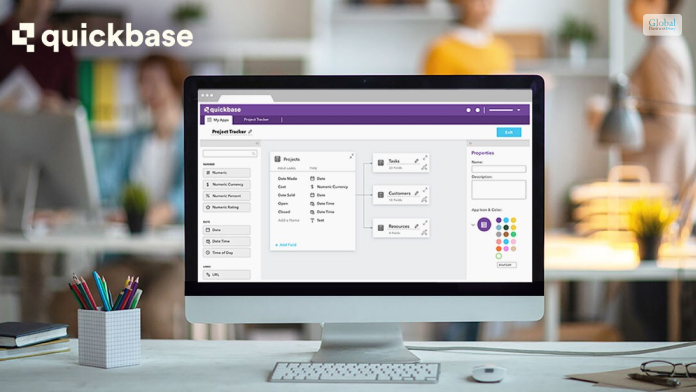
What Is QuickBase? A Low-Code Database Platform For Citizen Developers
QuickBase is a great software platform that allows you to streamline the work related to business management, lead management, and resource management for better work processes. This software platform is a no-code platform where you can empower your business teams to create, modify, and customize applications despite not having major programming skills. In this article, you will learn some basic details about QuickBase, which you need to be aware of if you try to purchase the software for your business. In addition to the pricing of the software, you will also learn about the major features of the software platform, which you can find after your QuickBase Login. Hence, you shall find out whether this software is a good option for your business or not. Finally, we will discuss some of the major pros and cons of the software. Hence, to learn more about the software, read on through to the end of the article. QuickBase – What Is It All About? In the year 2022, Inc. Magazine named QuickBase as the Best in Business SaaS software. This tells you that the company has made a positive impact on society, the environment, communities, and industries. You will have better access to better information. Furthermore, automated workflows and access through permissions can help in enhancing security. According to the official website of QuickBase, “A big focus at QuickBase is how to create better connections. Between your people, among your systems and data, with partners and collaborators. And that connection can – and should – go even further when you are truly effective.” Basically, QuickBase allows you to get all aspects of your business operations in one place. This acts as a centralized system that everyone can access. On the other hand, you will also have a better idea of what is happening at every stage of the business organization. Once you start using QuickBase, there shall be less risk for your organization, and you will be able to reduce the amount of waste that your organization generates. This, in turn, can help you to cut down your costs, as you can connect the existing systems of your business with the key contributors. Read More: Zoho CRM – Best Features, Pricing, Pros, Cons, And Alternatives QuickBase Pricing Provided the types of functions that QuickBase offers for businesses, the price looks quite affordable. Furthermore, once you try to purchase the basic version of the app, you will be able to use the app for a period of thirty days as a trial, where you will get all the features available at higher levels. Here are the pricing levels of QuickBase: PlansPricingTeam$35 per user per month (annual billing) for a minimum of 20 usersBusiness$55 per user per month (annual billing) for a minimum of 40 usersEnterprise- Fully customizable software- Price as per the types of services availed.- For the whole enterprise and interconnected use cases. QuickBase – What Are The Major Features That It Offers? QuickBase helps you streamline the processes of the organization, and your teams can also improve their complex business application. Furthermore, here, you will not need to worry about the cost of traditional development, maintenance, and deployment of resources. Here are the major features: Project management Portfolio management Resource management Budget and Finance Contract management Work-order management Subcontractor management Reports and Analytics, and many more. Why Can QuickBase Be A Good Option For Your Business? As per the claims of QuickBase’s official website, “QuickBase helps your team mitigate risk, reduce waste, and cut down on unexpected costs by connecting your existing systems with key contributors. With automated workflows and granular permissions, the right people will have access to the right information every time.” Apart from that, there is also QuickBase Training which you can avail of to become an expert with the software. Once you start using the software at all levels for the business, it will help in simplifying the processes. It also comes with a variety of options for integrations as well, as you can connect with all the QuickBase software systems, as well as third-party systems. Essential Pros And Cons Of QuickBase Like every other software platform, QuickBase also comes with its own set of pros and cons that are essential for you to know. The following are the major pros and cons that you will need to know about QuickBase: Pros Of QuickBase Here are the major pros of QuickBase, which shall surely benefit your business processes: The platform has very proactive and outgoing product support. There is a large user community forum, which is brisk. Here, you will be able to learn a lot about the software and clear your doubts as well. There are many customization options that allow you to personalize the software based on the needs and demands of the business. The reporting and analytic functions are plenty, and they are powerful as well. Such features can help you to make data-driven decisions for your organizations. There are plenty of integration possibilities with third-party applications as well. There are a variety of permission levels that can enable you to maintain better control of your business. Cons Of QuickBase The following are some of the cons of QuickBase which you need to be aware of if you are thinking about making a purchase: The software has many features and can get complicated in certain cases. Hence, there is a steep learning curve at the start. The mobile app is not so great and lacks functionalities and features. The budget and financial management tools are limited. There are some problems with the tables, as retrieving data can be difficult. If you want a summary of configuration information, it is not possible. Creating dynamic forms is complicated. Read More: Freshworks – Best Features, Pricing, Pros, And Cons: Let’s Discuss Summing Up Hope this article was helpful for you to find out whether QuickBase is a good option for your business or not. We think it is. If yours is a small business, this is great software to manage your business processes easily. What are your own reviews about the software? Share with us in the comments section below. Read Also: Leadfeeder 2023 Costs, Specifications, Evaluations, And Alternatives Creatio CRM – Review, Major Features, Pros & Cons, And More What Is Salesforce Sales Cloud? – Let’s Find Out In Details
Jul 18, 2023

Evolution Of Fintech: A Complete Story Of Start To Rise
Do you want to know the evolution of Fintech technology, its rise and fall? If yes is the reply from your end, then read this article, and you will get the complete insight of Fintech Evolution. Fintech is the combination of Financial Services and Information Technology. You need to know the combination of the two concepts to make things happen in your way. Without knowing the facts, things can become more difficult for you in the long run. The evolution of Fintech carries the legacy of different eras. Thus, it makes the process of evolution more concrete to meet the current needs of the users. You can take inspiration from history to make your way forward in the future. However, it is one of the Growing Industries in USA. History Of Evolution Of Fintech No big evolution can take place overnight, as is the case with Fintech evolution. 1866 to 1967 were the time of Fintech technology's commencement. Since then, the Evolution of Fintech has been moving at a faster pace. Let’s find out the details one after the other to get a clear insight into it. 1. Evolution Of Fintech From 1866 To 1967 Significant advancements in the financial industry marked the period from 1866 to 1967. Although the term "fintech," as we know it today, was not used during this time. The telegraph, invented in the 19th century, revolutionized long-distance communication. It enabled faster transmission of financial information, such as stock prices and market news, facilitating more efficient trading and investment decisions. This was also the era of Financial Globalization that most of us are unaware of. In this year of railroads and steamships that allowed faster transmission of financial information worldwide. The key events of this timeline include the first transatlantic cable. This event took place in 1866. Fedwire in the USA was the first Electronic fund transfer system that initiated the process of transfer. The 1950s started the credit card system to initiate the electronic fund transfer process. American Express Company followed with the use of their own credit card in 1958. 2. Fintech Evolution From 1967 To 2008 This period is crucial due to the shift from analog to the digital transformation of traditional financial institutions. The first ATM was installed in the Barclays Bank. Along with it, this was the beginning of modern Fintech technology. The evolution of Fintech has gone through several courses of time to establish itself in a strong position. There were various significant trends that took place in the early 1970’s. You must be aware of it while attaining your needs easily. The 1970s saw the introduction of ATMs, which revolutionized how people access their money. In the 1980s, electronic stock trading platforms like NASDAQ emerged, changing how securities are traded. In 1973, SWIFT(Society For Worldwide Interbank Financial Telecommunication) came into existence. The widespread adoption of the internet in the 1990s led to the rise of internet banking and online trading platforms. Thus making financial services more accessible and convenient. The E-commerce business models came into existence in the 1990s as well. 3. Evolution Of Fintech From 2008- 2014 The beginning of 2008 was a new landmark in the Evolution of Fintech industry. You need to know the details of it to have a clear insight into it. From 2008 to 2014, there was a global economic crisis that morphed into a general one. Most people start to show their distrust of the traditional banking system during this time of year. This led to the layoff of employees from banks and other traditional services to keep things in order. The release of Bitcoin in 2009 was the new landmark for Cryptocurrency and digital currency. This was the new landmark of this evolution of fintech technology. You must know the facts from your end to have a clear insight into it. The proliferation of smartphones in the 2000s paved the way for mobile banking apps. The mobile payment solutions enable people to manage their finances on the go. You need to go through the facts while meeting your needs with ease. 4. Fintech Evolution From 2014- 2017 Fintech Evolution from 2014- 2017 is one of the landmark years for most people. Try out the best options that can assist you in reaching your requirements with complete ease. This was the key factor for digital banking all around the globe. With the improvement of Fintech Technology, how do they access the internet in the developing world? You must consider the facts that can assist you in reaching your requirements with complete ease. The popularity of digital wallets, such as Apple Pay, Samsung Pay, and Google Pay. This grew during this period, enabling users to make contactless payments using their mobile devices. You must ensure that the chances of errors are as low as possible. P2P payment platforms like Venmo, PayPal, and Square Cash gained popularity. Thus making it easier for users to send and receive money from friends, family, and businesses. 5. Evolution Of Fintech From 2018 to Today Blockchain Technology and open banking continue to drive innovation for future financial services. This can boost the scope of your brand value to the next level. The game changers were NEO banks. It almost challenges the complexity and pricing of traditional banks. Open banking initiatives have continued to gain momentum, particularly in Europe and other regions. These initiatives aim to increase competition and innovation by allowing third-party developers to access bank data and create new financial products and services. Embedded finance, the integration of financial services into non-financial products and services, has become increasingly prevalent. This trend has led to the rise of fintech partnerships and collaborations across various industries. Fintech has played a significant role in improving financial inclusion, particularly in emerging markets. Mobile money and digital payment solutions have helped expand access to financial services for underserved populations. Benefits Of Fintech Technology There are several benefits of Fintech Technology that you should know from your end. While you want to grow your business in the right order, you cannot ignore the importance of Fintech Business. 1. Improved Accessibility Fintech has made financial services more accessible to more people, especially those in underserved or remote areas. Digital banking and mobile payment solutions have enabled people to access banking services without needing to visit a physical branch. There are several top expert network companies who seek the assistance of Fintech business today. 2. Cost Savings Fintech companies often operate with lower overhead costs compared to traditional financial institutions. This can lead to cost savings for both businesses and consumers, as fees and charges may be lower. Fintech companies can save you time at the time of making costly transactions. 3. Increased Efficiency Automation and digitalization have improved the speed and efficiency of financial transactions. Processes that once took days can now be completed in minutes or even seconds. 4. Enhanced Customer Experience Fintech has revolutionized the customer experience in banking and finance. Mobile apps and online platforms provide users with convenient access to their accounts and financial tools. Thus, leading to higher levels of customer satisfaction. You may have a lack of skills to develop your business goals with ease. 5. Innovation & Customization Fintech companies are known for their innovative approaches to financial services. They often develop new products and services that cater to specific customer needs, leading to a more personalized experience. Although, with the application of innovation and development, things can become easier for you in the long run. 6. Financial Inclusion Fintech allows for more personalized financial services, with the ability to tailor products and recommendations to individual customer needs and preferences. You must understand reality if you want to meet your requirements with complete ease. It can boost your earnings chances to the next level. Without knowing the reality, things can turn worse for you in the long run. 7. Improved Security Fintech companies invest heavily in cybersecurity to protect user data and transactions, offering secure platforms for financial transactions. The financial data is very sensitive. So, if it falls into the hands of hackers, then your bank account can reflect zero balance. To get rid of Fintech data breach issues. Companies have to seek assistance from cybersecurity experts to reduce chances of data breaches. Why Evolution Of Fintech Technology Carries Problems Of Data Breaches? There are several reasons why Fintech Technologies carries the problems of data breaches. If you are not careful enough, then your valuable financial data will be under the clutches of Cyber criminals. Fintech companies often handle large volumes of sensitive financial data, making them attractive targets for cybercriminals. The complexity of fintech systems often involves multiple interconnected components and third-party services. This can create vulnerabilities that hackers can exploit. Many Fintech companies need to integrate with legacy banking systems. Thus, it may have outdated security measures that can be easier to breach. The lack of standardized security practices across the fintech industry can make it challenging to ensure consistent protection. Thus, your company becomes vulnerable to data breaches of sensitive financial data. Despite technological advancements, human error remains a significant factor in data breaches. Some of them are phishing attacks or improper handling of data. Fintech companies must comply with various regulations related to data protection and privacy. Thus, it can be complex and challenging to navigate. You must try to keep the things mentioned in mind while handling the activities of the Fintech business. Today, in the 21st century, Data is gold, and so you need to protect your data from hackers. Thus, it ensures financial security in your organization. How Ethical Hackers Protects Fintech Technology Business? There are several ways Ethical Hackers protect Fintech Technology Business from the clutches of hackers to a considerable extent. Additionally, you must be aware of the reality while you want to go through the facts with complete ease. Some of the core factors that you should know from your end are as follows: - 1. Identifying The Vulnerabilities Ethical hackers use their skills to find vulnerabilities in fintech systems, applications, and networks that malicious attackers could exploit. You can seek the assistance of ethical hackers who can help you in finding the vulnerabilities with complete ease. Thus, making things work in the correct order within a specific time. 2. Doing The Penetration Testing They conduct controlled attacks (penetration tests) to simulate real-world attacks and assess the security posture of fintech systems. This helps in identifying and fixing vulnerabilities before attackers exploit them. Furthermore, penetration testing will reduce the chances of phishing attacks on your database. 3. Having Security Audits Ethical hackers perform security audits to evaluate the effectiveness of security controls, policies, and procedures in place within fintech organizations. Without having security audits, you cannot figure out the source of phishing attacks on your database. Thus, you must keep your system and process free from spam and bugs. 4. Getting The Recommendations For Improvement Based on their findings, ethical hackers provide recommendations and best practices to improve the overall security posture of fintech businesses. You can get the recommendation for your improvement in data security if you seek the assistance of an ethical hacker. Try to keep things in place while meeting your needs. Furthermore, for your smooth pipeline in finance you need to seek recommendations. 5. Compliance Ethical hackers help fintech businesses comply with regulatory requirements and industry standards related to cybersecurity. Maintaining regulatory compliance will help you in meeting the evolution of Fintech technology to attain your requirements. 6. Having The Training & Awareness They may also provide training to employees to raise awareness about cybersecurity threats and best practices. Keep the training and induction program in place within your organization if you are running the Fintech business. Otherwise, you may have to face the situation of data compromise in the long run. Final Take Away Hence, if you want to go through the evolution of Fintech Technology, you must consider the mentioned facts. This can boost the chances of your Fintech Business development in the long run. You can share your opinions and views in our comment box. This will help us to know your opinion regarding this matter. Without knowing the facts, you cannot make the wrong selection. Overall, ethical hackers play a critical role in helping fintech businesses protect their technology infrastructure, maintain regulatory compliance, and build trust with their stakeholders. Try to keep things in perfect shape while meeting your needs. For More Business Related Article: Pro Rata: Definition, Uses, And How To Calculate It? What Is The Leverage Ratio And How to Calculate It? Trial Balance: Definition, Working, Importance, And More
Feb 22, 2024

How To Improve Energy Efficiency In Your Data Centre
As data centres continue to grow in size and complexity, it's become increasingly important to focus on energy efficiency. There are a number of ways to improve energy efficiency in your data centre, which can have a big impact on both your bottom line and the environment. In this blog post, we'll explore some of the most effective ways to improve energy efficiency in your data centre. By implementing these best practices, you can make a real difference in your data centre's energy consumption. Let's get started! Understand How Your Data Centre Uses Energy Gaining an understanding of how your data centre uses energy is essential for ensuring that it runs effectively and efficiently. By routinely tracking the power consumption of your servers and other devices within your data centre, you can begin to identify where potential improvements can be made in terms of energy efficiency. Additionally, it is worth looking into how different cooling strategies, such as liquid cooling, or revised ventilation systems may help reduce the amount of energy consumed by your data centre overall. To make sure you get the most out of this process though be sure to seek advice from subject matter experts and seek out solutions through research that are tailored to your unique environment. Evaluate Your Data Centre’s Energy Usage Keeping tabs on the energy usage of your data centre is essential for maintaining efficient operations. It's important to regularly evaluate the power, cooling, and ventilation protocols to ensure they are all optimized. If these systems aren't working in harmony, it could increase operational costs as well as put stress on equipment that could lead to unexpected downtime. To make sure everything is running smoothly, consider hiring an external auditor to conduct an energy audit of your data centre in order to identify any areas of improvement and locate potential cost savings. Doing so can help you not only boost the efficiency of your data centre but also save money and reduce your environmental footprint. Improve Data Centre Efficiency Data centres process crucial information for technology companies, yet their efforts to improve energy efficiency are often overlooked. Implementing small changes to infrastructure and power delivery can significantly reduce the amount of energy consumed. Power management systems should be properly set up, and nonessential components such as memory and controllers should be deactivated. Additionally, ensuring proper ventilation with fans and cooling systems can help mitigate the inefficiencies of around-the-clock computing power. Finally, opt to find electricity rates that fit your needs or utilize renewable sources such as solar and wind to reduce overall electrical consumption. With these changes in place, data centres can drastically improve their overall energy efficiency levels, greatly reducing operational costs in the long run. Monitor Energy Usage Monitoring the energy usage of your data centre is essential when making changes. Keeping tabs on things like power consumption and temperature variations provides an opportunity to make accurate adjustments that enable efficient resource management, helping you save costs over time. Staying up-to-date with knowledge about current energy levels gives you a head start when it comes to identifying areas for improvement and makes it easier to implement negative for positive change. To maximize performance, the process of monitoring how much energy is being used should be done regularly and consistently. Adjust For Efficiency Taking steps for data centre infrastructure solutions can help reduce costs and improve the environment. To capitalize on those results, facility managers should continuously adjust their approaches - examine current practices, utilize new technologies or techniques as they become available, measure and monitor power, cooling, and operations, and rethink how all of these components can work together for improved performance. Implementing these changes will not only give your data centre a more efficient infrastructure but could also add up to big savings in the long run. Ultimately, taking action now to adjust the data centre towards greater energy efficiency will pay dividends well into the future. Conclusion Implementing these changes to increase energy efficiency in your data centre doesn't have to be overwhelming. Start by learning as much as you can about how your data centre uses energy and evaluate what methods can be used to improve it. Remember to always stay mindful of the changes being made and how they're impacting energy usage. Also, monitor the data centre after the changes are made to see firsthand the impact of energy efficiency improvements. Finally, continuously adjust your strategy as needed, so that you'll remain on top of any additional gains in energy efficiency that can be made. With dedication and thoughtfulness, you'll be able to create an efficient and optimized data centre that saves energy! Read Also: Top 7 Part-Time Work From Home Jobs Top 5 Types Of Business That Are Giving More Profits To The Sellers What Is A Business Development Consultant, And What Are Their Job Roles?
Feb 25, 2023